Wednesday, June 29, 2011

Model-first with Entity Framework and Oracle 11g (Part 1)

In the very latest beta release of the Oracle .Net drivers (11.2.0.2.30), Oracle now ‘supports’ Entity Framework (database-first or model-first) and Linq-to-entities. Oh, and 32bit only for now.

(If you’re tempted to try this, and get a 'ORA-00904: "SUBPROGRAM_ID": invalid identifier' error it’s probably because you – as a developer - are using 10g Express Edition, which isn’t yet supported. You can wait for the EF beta 2 (soon, allegedly), or alternatively you can download 11g Express Edition which is also in beta. And 32 bit only (on Windows, anyway). Oh, and make sure you install the ODAC after you install XE, or you’ll get the wrong Oracle home as your default on your path, and you’ll get errors in Visual Studio setting up Oracle database connections)

Prior to EF I’ve been quite happy doing database-first development in the SQL Server world, mostly because the visual tooling (database diagrams and the like) has been pretty good, and because of the type fidelity with mainstream languages (esp. .net) there’s relatively little loss of intent when you derive a model from the schema.

In the Oracle world of course this is very different. I’ve been massively underwhelmed with the quality of the tooling for schema design, and Oracle’s unconventional[1] stance on 4-byte integer and boolean data types (i.e. lack thereof) means that any model derived from the schema is going to need a fair bit of tweaking the metadata. That and fixing up all the SHOUTING_IDENTIFIERS.

So for Oracle, model-first looks like a really good idea. Unfortunately, in the current beta at least, Oracle’s support for this is pretty lame:

  • All integer types are written out as Number(38,0) (irritating)
  • Sequences are not generated for identity fields (really painful)
  • The PascalCasing of your entities is preserved in the database schema (totally unusable).

e.g.:

-- Creating table 'Customers'
CREATE TABLE "myschema"."Customers" (
"Id" number(38,0) NOT NULL,
"FirstName" nvarchar2(50) NOT NULL,
"AnInteger" number(38,0) NOT NULL,
"ALong" number(38,0) NOT NULL,
"IsSomethingTrue" number(38,0) NOT NULL
);


Why unusable? Because, as any Oracle developer will tell you with a bitter look, Oracle is case sensitive. Generally when you query it it all works as if your query was upper-cased for you: select * from mytable works against MYTABLE. But if you use Mixed Case and create a MyTable you’d have to write select * from “MyTable” (note the quotes) and get the capitalization right. Yeah, you can see how much fun you could have with this, and it’s the same with columns. So stick to the SHOUTING_IDENTIFIERS convention, or suffer the horrible consequences. It’s ok, I didn’t know either.


So what any sane SSDL / DDL generation template would do would do a conversion, right? Entities named MyTable would spit out a table called MY_TABLE, and the MyTableId attribute would be a MY_TABLE_ID column. But no.


Worse than that, because Oracle’s implemented the entire generation process in a workflow, not in the T4 template (which is a stub) you can’t fix this on your own.


That’s about where I gave up on Oracle. Bastards.


Next time: 3rd party drivers to the rescue!


[1] I’m trying to be polite. Prehistoric would be more apt. DB2, MySql, Postgres (and SQL Server of course) have 4 byte integers because that’s what applications / CPUs actually use. Oracle act like it’s still 1990 and the ‘database IS the application’

Tuesday, June 07, 2011

Australian Dev User Groups

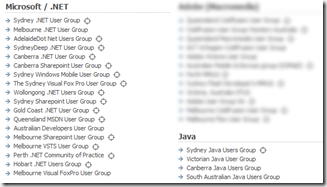
I was looking for (and failed to find) a Perth Java User Group, and came across this list in builder.com.au. If accurate it seems to depict a bleak state for Java, loosing out 4:1 to .Net in user group count terms:

image

Ok, massive caveats apply. Number of user groups is a terrible metric, maybe the Java ones have much higher membership / do more with less / do everything online, or maybe they’re all so good they don’t need user groups unlike the poor fumbling .Net developers. But I don’t think so…

Thursday, June 02, 2011

“PhpStorm 2.1 doesn't work too nice on my Windows + Samba anymore”

Got a really bizarre email from JetBrain’s bug tracking system the other day: a ‘won’t be fixed’ for a bug I had absolutely no interest in.

Like many users, I’d enabled notifications for ‘issues reported by me’. Turns out that someone had registered a user with the name ‘me’…

…yup…

…and so managed to spam the entire registered user base when anything happened to any of their bugs :-/ So some fairly serious design failure there: user-entered data being mistaken as a control sequence - basically SQL injection (in spirit, at least).

Good job he didn’t register as Little Bobby Tables.


PS: Of course this is all a bit passé compared to hacking the electoral role
PPS: Why isn’t data tainting a compulsory part of all mainstream languages these days?

Monday, May 30, 2011

Permissions Issues in Dynamics CRM 2011 when Users Inherit Roles from Teams

Setting up a CRM demo I noticed what appears to be a problem in the CRM 2011 security model which affects users whom only inherit a Security Role from their membership in a Team, and have no roles of their own.

My user is in a Team, and the Team has the out-of-the-box Customer Service Representative role. But my user can’t create a Service Activity like he should be able to:

image

I thought the team permissions were right for creating Activities, but MSDN just has a ‘coming soon page’ for both the roles and doesn’t even list the Activity entity so I wasn’t getting much help there.

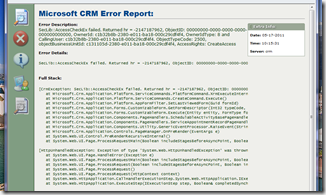
Some error dialogs in CRM have a little ‘view log’ button, which helps, but this one didn’t. However the TechNet article ‘Troubleshooting Microsoft Dynamics CRM’ was quite helpful here (written for CRM 4.0 but much is still relevant), describing how you activate the detailed error dialog by modifying this setting in the app.config:

<add key="DevErrors" value="On"/>

image

This gave me something a bit more concrete to go on:

SecLib::AccessCheckEx failed. Returned hr = -2147187962, ObjectID: 00000000-0000-0000-0000-000000000000, OwnerId: {blah}, OwnerIdType: 8 and CallingUser: {blah}. ObjectTypeCode: 2500, objectBusinessUnitId: {blah}, AccessRights: CreateAccess

Ok, so I can’t create something. But interestingly a bit of poking about in the metadata schema in the database (Metadata.Entity) reveals ObjectTypeCode 2500 is not actually Activity, as I suspected, but UserEntityUISettings.

Hmm. The team’s got permissions for that too I thought:

image

... but that permission can only be applied at the user level. So I wondered if it wasn’t transitive over the Team correctly, and added the user directly to the role.

And then it all worked.

Perhaps there is an explanation somewhere, but I’m damned if I can find it. Services and Service Activities are new in 2011 and seem to be skipped entirely by the two CRM books I looked at. There is some documentation around the permissions model, but it’s incomplete, and most blog posts I’ve read seem to suggest diagnosing issues is a bit of a crapshoot, which is pretty piss poor for a business-orientated application if you ask me. And I’d hate to have had to diagnose this in the cloud, without access to the database...

Monday, May 23, 2011

More whinging about Hash Aggregate

I previously posted on why Hash Aggregate is to be avoided if possible. Unfortunately Hash Aggregate vs. Stream Aggregate appears to be an ‘all or nothing’ proposal. And that sucks.

A Stream Aggregate can be relatively cheap (in terms of memory pressure) because it can leverage the ordering (typically clustered index ordering) of the input data and aggregate on-the-fly. By contrast the Hash aggregate has to cope with completely disordered data streams, so must buffer all the output aggregates in memory until the input data has been entirely read:

"The other aggregation operator, hash aggregate, is similar to hash join.  It does not require (or preserve) sort order, requires memory, and is blocking (i.e., it does not produce any results until it has consumed its entire input).  Hash aggregate excels at efficiently aggregating very large data sets.”
[Craig Freedman - http://blogs.msdn.com/b/craigfr/archive/2006/09/20/hash-aggregate.aspx ]

This is a good strategy because:

  • It copes with totally unordered data
  • Provided you are aggregating to a significantly higher grain than the source data, the volume of aggregates in the hash (and hence memory consumption) can be relatively small.

In my case, of course, the latter isn’t true: I’m aggregating across a significant amount of data, but not aggregating very much, so I am experiencing vast quantities of tempdb spill.

My input data is partially aligned to the aggregation (the most significant column is sorted correctly), so you’d expect that the aggregation would be able to leverage that smartly, to output aggregates when they were clearly ‘done’. So, for example, if you had a clustered index on Month/Day/Category, and you were doing sum(something) GROUP BY Month, Category, you and I both know that after you’ve finished spooling data for any given month, you can output all those buckets, rather than hang on to them waiting for more. Unfortunately this doesn’t happen, which means given enough data, something will spill to disk:

“if we run out of memory, we must begin spilling rows to tempdb.  We spill one or more buckets or partitions including any partially aggregated results along with any additional new rows that hash to the spilled buckets or partitions”
[Craig’s blog again, same link as before]

One can only hope it’s the older buckets that get spilt first, but even so, when this happens you are taking the IO hit of streaming all that aggregate data to disk and then subsequently loading it all back in again. Ouch. Or you force the stream aggregate (using a hint) and take the pain of the sort. More ouch.

For many workloads this probably isn’t much of an issue, but for my data warehouse this is starting to look like a major, major bottleneck.

Thursday, May 19, 2011

Setting up CRM 2011? Set the Calender format *first*

When you create a new Dynamics CRM 2011 organizational instance, the localization settings for that Organization default to US format, totally ignoring the settings of the installing user, defaults for the server etc…

image

You can change this in Settings \ Administration \ System Settings \ Format, but make sure you do so before you add any users to the CRM instance, because when you change it it doesn’t apply retrospectively to users already created. Hardly intuitive, I think you’ll agree, and you’d at very least expect a note (or warning) on the dialog that all you are changing (apparently) is the new user default.

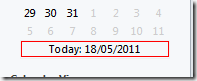
eg: After changing to Australian format, new users correctly see this:

image

However, a user created before the change still sees this:

image

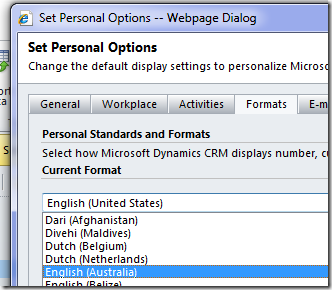
These users must each and every one go into their dashboard options and change their personal format settings to get what is now the system setting.

image

image

You’d notice this fairly early on I imagine, but you could still have created a bunch of content and a bunch of users, so this could be a real administrative pain in the arse.

Silverlight Spy

This looks cool – a Hawkeye for Silverlight apps (in and out of browser). Basic version is free.

Good Overview, there’s also a video on C9

Wednesday, May 18, 2011

NineMSN vs IE9

NineMSN still shows up as ‘compatibility view’ in both IE 8 and 9, despite what the banner ad below might suggest:

image

Note: I wrote this two months ago and forgot to publish it. But it’s still true...

Tuesday, May 17, 2011

Excel Multiselect Issues with SSAS Calculated Member

Ok, it’s an old one, but I struggled to find the right answer, so I thought it was worth a post. I knew it was an issue, and I thought I knew the answer. I was wrong.

Say you create a calculated member to return some kind of item count against a dimension, a bit like this:

CREATE MEMBER CURRENTCUBE.[Measures].[Days Count] as (
count( descendants(
  [Date].[Year-Month-Date].CurrentMember,
  [Date].[Year-Month-Date].[Date]
))

and it works just fine when you test it

SELECT {
    [Measures].[Days Count]
    ,[Measures].[Minutes Of Day Count]
} ON COLUMNS
FROM [My Cube]
WHERE {
    [Date].[Year-Month-Date].[Year].[2011]
}

image

…and then you find it falls apart when someone queries the cube in Excel and uses multi-select in the pivot table filter. So you follow Mosha’s advice to fix it (using Existing):

CREATE MEMBER CURRENTCUBE.[Measures].[Days Count] as
count( existing [Date].[Year-Month-Date].[Date] )

…but then someone points out that that doesn’t work either. More recent versions of Excel (2007, 2010) implement multi-select via sub-queries; with just a few days selected it generates a query that (simplified) looks a bit like this:

SELECT {
    [Measures].[Days Count]
    ,[Measures].[Minutes Of Day Count]
} ON COLUMNS
FROM (
    SELECT (
        {[Date].[Year-Month-Date].[Date].&[20110101]
        ,[Date].[Year-Month-Date].[Date].&[20110102]
        })
    ON COLUMNS  FROM [My Cube]
)

and executing that doesn’t give you the right answer (it just counts the number of members in the dimension):

image

So the old advice, still commonly quoted, is actually wrong. The solution (as of SSAS 2008 and onwards) is to use a dynamic named set:

CREATE DYNAMIC SET [Selected Days] as (
    [Date].[Year-Month-Date].[Date]
)
CREATE MEMBER CURRENTCUBE.[Measures].[Days Count] as (
    count([Selected Days])
)

I found this a bit bizarre at first, but some of the posts I read were themselves a bit confused and left in the ‘existing’. This is not required, and distracts from what’s really going on here: this works by design as this is one of the problems that dynamic sets are intended to fix. A (more recent) Mosha post spells it out:

“Dynamic sets are not calculated once. They are calculated before each query, and, very important, in the context of that's query WHERE clause and subselects”

image

Ah. The answer, and the explanation. Finally.

Thursday, May 12, 2011

When Tabs go Bad

Maybe it’s just me, but I don’t think a tabbed UI is cutting it any more for the New User dialog in Active Directory:

image

Also just me, but ‘Remote Desktop Services Profile’ strikes me as about twice as long as it should be for a tab header.

Update: Later I found the Active Directory Administrative Center, which is an apparently WPF-based replacement for all this, and looks much nicer. So I guess the dialog above is deprecated anyway.

Monday, April 11, 2011

Configuring SSAS 2008 HTTP access on IIS 7.5 using PowerShell

…was way too much like hard work / blindly poking about in the dark, and there’s still a nasty hacky bit in the script where I gave up trying to make the IIS snap-in work, and just used appcmd, but it does actually work:

<#
.Synopsis
Configures HTTP access for SSAS on the local box

.SeeAlso
http://technet.microsoft.com/en-sg/library/gg492140(en-us).aspx
http://learn.iis.net/page.aspx/436/powershell-snap-in-changing-simple-settings-in-configuration-sections/
http://www.iis.net/ConfigReference/system.webServer/security/isapiCgiRestriction
#>
$ErrorActionPreference = 'stop'
$scriptDir = split-path $myInvocation.MyCommand.Path;
$isapiPath = "$scriptDir\msmdpump.dll"

import-module WebAdministration
cd IIS:\

# Register msmdpump as a (globally) acceptable ISAPI handler
$isapiRestrictions = Get-WebConfiguration /system.webServer/security/isapiCgiRestriction
$handler = @($isapiRestrictions.Collection | ? { $_.description -eq 'OLAP' } )
if(-not $handler){
# This way the object always appears locked?
# but should be fine according to http://forums.iis.net/t/1158906.aspx
$null = @"
$restrictions = $isapiRestrictions.GetCollection();
$handler = $restrictions.CreateElement('add');
$handler.SetAttributeValue('path', $isapiPath);
$handler.SetAttributeValue('allowed',$true);
$handler.SetAttributeValue('description','OLAP');
$restrictions.Add($handler);
"@

# instead try
# http://serverfault.com/questions/134361/programmatically-add-an-isapi-extension-dll-in-iis-7-using-adsi
& "$env:windir\system32\inetsrv\appcmd.exe" set config /section:isapiCgiRestriction /+"[path='$isapiPath', description='OLAP',allowed='True']"

}

# Create the app pool
cd IIS:\AppPools
if(-not (Test-Path OLAP)){
$olapAppPool = New-WebAppPool OLAP
}else{
$olapAppPool = Get-Item OLAP
}
$olapAppPool.managedPipelineMode = 'classic'
$olapAppPool | Set-Item

# Create the website
cd IIS:\Sites
$defaultSite = @(dir)[0]
cd $defaultSite.Name

if(-not (Test-Path OLAP)){
$olapApp = New-WebApplication OLAP -physicalPath:$scriptDir
}else{
$olapApp = Get-Item OLAP
}
$olapLocation = '{0}/{1}' -f $defaultSite.Name,$olapApp.Name
cd OLAP

# Setup the web application: first associate the app pool
set-itemproperty $pwd -name applicationPool -value 'OLAP'

# ...then enable anonymous access
$basicAuth = Get-WebConfiguration -Filter /system.webServer/security/authentication/anonymousAuthentication
$basicAuth.Enabled = $true
$basicAuth | Set-WebConfiguration -Filter /system.webServer/security/authentication/anonymousAuthentication -PSPath IIS:\ -Location $olapLocation

# ...and create a mapping for that handler for this web app
$mapping = Get-WebHandler OLAP
if(-not $mapping){
$mapping = New-WebHandler OLAP -ScriptProcessor:$isapiPath -Path:*.dll -Verb:* -Location:$olapLocation -PSPath:IIS:\ -Modules:IsapiModule
}
$mapping


Wow. IIS administration is just as bizarre and arcane as it always was. Did someone say ‘where is the setup wizard’?

Wednesday, March 30, 2011

Avoid Hash Aggregation

I’d been wondering about this, but Simon Sabin’s recent post just spelt it out for me: Hash Aggregation is all too easy to do, but eats performance for breakfast. We’re all used to the problem of SARGable arguments, right? You perform any operations on the parameter not the column in order to correctly hit the indexes you’d expect to hit. So for example you wouldn’t do this:

select blah
from table
where year(datecolumn) = @myyear


but instead you’d do this:

select blah
from table
where datecolumn >= @myyear and datecolumn < dateadd(year, @myyear, 1)


Well exactly the same problem occurs with aggregates, but without the fix. Say datecolum was datetime2(0) – ie down to the second, and you want an annual aggregate of something. For example:

select year(datecolumn) as Year, itemId, sum(cost)
from table
group by year(datecolumn), ItemId


Look what we did. We had to apply the function to the column, and hey presto, despite our underlying table having a clustered index in datecolumn, itemId order, our aggregation is a Hash Aggregation because SQL can’t infer the relationship between a Year and a DateTime. It can’t use Stream Aggregation unless the data is in the right order, which it now can’t infer, and it thinks the hash is going to be cheaper than a full sort.

But Hash Aggregation is expensive, as you only have to read the doco to realise:
For the distinct or aggregate operators, use the input to build the hash table (removing duplicates and computing any aggregate expressions). When the hash table is built, scan the table and output all entries. http://technet.microsoft.com/en-us/library/ms189582.aspx

That hash just buffered all our data in order to do the aggregation. Opps, TempDb spill here we come…

A Stream Aggregation is much more performant because it can perform the aggregation ‘on the fly’ because the data is in order, but to do this in our example we’d have to have a calculated, indexed column ‘Year’, and indexing means it’s persisted, so bang we just added 4 bytes to our fact rows and increased my table size by about 20% (my table is not very wide, but very, very long). And I still need the existing clustered index, so we’re creating a non-clustered index and the relative cost difference for scanning the table might mean we still don’t get what we want.

How much worse is the Hash? I cooked up an example with some of our data against three scenarios:

  • doing an annual aggregate based on munging dates into years (the group by above)

  • doing the aggregate based on adding the year column and putting it in the clustered index

image

88% : 12%. Quite a difference (though the rowcount here is fairly small so this may not be entirely representative).

Ideally Sql would ‘see through’ the Year (and other date related functions) and deduce that it can still use the date-ordered clustered index to service a stream aggregation, and this is exactly what Simon’s opened a Connect issue asking for.

That article seems to suggest that there are workarounds, like joining to the date dimension table and grouping based on columns from that, which I tried in vain. However, this may only be relevant when you’re limiting to a subset of the data. More importantly, this is only viable if the original column was of type Date: if you had a DateTime2(0) you’d need to join against a combined Date-And-Time dimension (getting fairly large). If you had DateTime2(2), you’d need to join against a date dimension that went down to the 100’th of a second. That’s a big dimension (3,153,600,000 rows / year).

Ultimately given my real world scenario is doing lots of aggregations from the sub-minute up to the minute grain, I had to bite the bullet, and change the column in the fact table to smalldatetime (and put the seconds portion in a different column). And that seems like a really poor outcome for what you would have thought would be a bread-and-butter warehousing requirement[1].

Here’s a really excellent write up of the two different operators from Craig Freedman’s blog:


[1] I’m only doing any of this at all because of limitations in SSAS and trying to avoid calc-and-sum performance issues, so it’s all a bit frustrating.

Tuesday, March 29, 2011

Static Lookup Data: Prefer CASE to JOIN when possible

Getting into the nitty-gritty of fine-tuning the datamart I’m working on now, so spending a lot of time looking at execution plans, and wondering ‘why?’. Today: lookup data.

Normally in a datamart you’d denormalize as much as possible, ideally avoiding JOINs altogether, but there’s a trade-off with space and in some cases the space cost just can’t be justified. Sometimes you still have to add some lookup data (cost rates etc…) in your fact view.

Given a tiny amount of lookup data (10’s of rows), I thought putting it in a little table and doing a join would be pretty performant. The lookup table will basically just sit in RAM all the time, and it’s tiny compared to the fact data so the optimizer can’t possibly it the wrong way round. And I thought searched CASE statements were expensive. Turns out they are nothing on a JOIN, even in the optimal case.

Adding columns using a CASE statement performs significantly better than the static lookup table strategy. Even when the CASE statement is rolled up into a table-valued function, the costs in my case are about 2:1 in favour (the TVF is successfully ‘optimized away’).

In both strategies SQL has to look at each-and-every row, so I’m surprised it’s that different, but I guess maybe the Hash Match is optimized for larger amounts of data (on the right side), and can’t match a CASE for trivial lookups. There’s also the cardinality to consider: a CASE devolves to a COMPUTE SCALAR, which means no change in the number of rows, but a Hash Match might output a row more than once (or drop rows) based on the number of matches on the right side of the query. I’m guessing this constraint means there’s a fundamentally cheaper way to process the data in memory.

Here’s the before and after, with a relatively small number of rows (70,000 on my dev box, but it’s near exactly the same with 100+ million in the test environment):

image

Now you’ll have to excuse me, because I have some views to change…

Friday, March 25, 2011

Enabling Sql Server CLR Integration if not currently enabled

I don’t know, is calling RECONFIGURE unnecessarily an issue? Anyway, if you really want to only enable the integration if it’s not already enabled (and maybe want to do something else at the same time):

DECLARE @config TABLE (
NAME sysname,
minimum INT,
maximum INT,
config_value INT,
run_value int
)

INSERT INTO @config
EXEC sp_configure 'clr enabled'

IF EXISTS (SELECT run_value FROM @config WHERE run_value = 0)
BEGIN
PRINT 'Enabling CLR integration'
EXEC sp_configure 'clr enabled', 1;
RECONFIGURE;
EXEC sp_configure 'clr enabled'
END

Wednesday, March 16, 2011

What bits to download for SQL Cumulative Updates

If you look at the download page for Sql 2008 R2 CU 6, you’ll a choice of six different download packages all for your platform:

image

Whu? Actually it turns out that all but one of these are subset packages of the main hotfix, that you’d only need to apply if – say – you only wanted to patch PowerPivot or SQL Native Client, but you didn’t want to have to download the whole update*.

Quite why this isn’t deemed worth mentioning anywhere in the relevant knowledge base article or on the download page itself is beyond me, but fortunately I happened to stumble upon an article on the SQL CSS team blog that explained it all (after I’d already downloaded half of them) so now I know.

And now, so do you.


[*] Note the rules are different for Sql 2005 – you do have to download all of them. So no potential confusion there.

Wednesday, March 09, 2011

Extract Zip from PowerShell

Adapted from an old Powershell Guy post, and flipped around to unzip the files:

function unzip($zipPath, $destination){
$shell = new-object -com shell.application;
$zip = $shell.NameSpace($zipPath);
foreach($item in $zip.items()){
$shell.Namespace($destination).copyhere($item)
}
}


Evil use of shell object (where is the managed API?), but seems to work quite nicely actually. Note carefully the brackets after $zip.Items().


Now I’ve worked it out it seems really easy to find others doing the same thing. Oh well.


Tuesday, March 01, 2011

Configuring HTTP Access for Analysis Services 2008 R2 64 bit

It’s basically no different from 2005, so follow these instructions, ensuring that (if needed) you download the OLE-DB provider for AS from the 2008 R2 feature pack site, and not one of the vanilla 2008 releases, and also ensuring that don’t mark your app pool as ‘enable 32 bit’.

You may find that the web role services ‘ISAPI extensions’ or ‘Windows Authentication’ isn’t even enabled on your box, and you will need those. You can get these up by right-clicking the web server node:

image

A good way to test this is to try and connect using Management Studio. If it fails with a ‘unsupported data format’ error, and you put the pump on a different box to the SSAS instance, it’s probably a double hop issue, and you’re going to have to send yourself insane talking to IT about configuring SSAS to use Kerberos authentication, constrained delegation, SPNs and all the normal fun stuff. I feel for you.

I bit the bullet and installed IIS directly on the SSAS box, and got a bit further. A good way to test at this point is to try and connect to SSAS locally using Management Studio, using the http://<server>/olap/msmdpump.dll path. If that works, at least you know the SSAS/IIS end is ok. But then I still couldn’t connect from Excel on my workstation, in a different domain, which was why I was doing all this in the first place.

I used the old ‘create local user with matching login/password’ trick, and ran Excel as that, but that which didn’t work. Guessing the lack of trust between the domains would be a problem I attempted to disable Kerberos and force NTLM (which seems to have changed a bit from how it used to be done on Windows 2003), but that still didn’t work either (IIS logs helped here). Eventually I just enabled anonymous access to the website, changed the app pool credentials to use Local Service (Network Service would have done), granted IUSR access to the cube (this bit I don’t quite follow, why not Local Service?) and finally it all worked. But note that now I was using anonymous access I didn’t need to install IIS at all, since I could have done this from any box. Ho hum.

Finally go and vote for this to be supported out-of-the-box. With all the work that went into separating out the HTTPSys bits (for WCF et al), this should be a total no-brainer.

Monday, November 15, 2010

Column Store Indexes in Sql Server Denali

It’s funny because a college and I were having a discussion in the kitchen the other day about the whole ‘no SQL’ movement, and my point to him was that many of the advantages pertained to having a columnar storage model, and (especially in the light of Vertipaq) I didn’t think it would be long before this kind of storage mode migrated to mainstream RDBMs’s like SQL Server.

And then this, in Denali (Sql Server v-next):

“The columnstore index in SQL Server employs Microsoft’s patented Vertipaq™ technology, which it shares with SQL Server Analysis Services and PowerPivot. SQL Server columnstore indexes don’t have to fit in main memory, but they can effectively use as much memory as is available on the server. Portions of columns are moved in and out of memory on demand.”

MVP’s have been able to download CTP1 for a fortnight apparently, which means Mitch has been holding out on me. Damn his poker face.

Thursday, November 04, 2010

Debugging Talk Tonight

Tonight’s talk at the Perth .Net User Group should be pretty good – because it’s me talking! Barring uber-embarrassing stuff-ups, I will be talking about and demonstrating debugging techniques using WinDbg and PowerDbg, and hopefully shedding some light on an area that’s generally under-utilized by many .Net developers.

Join us at Enex 100, Level 3 Seminar room at 5.30pm. More details in the link above.

Popular Posts