Showing posts with label sql. Show all posts

Thursday, August 14, 2014

SMO issues with SQL 2012 SP2

After rolling out SQL 2012 SP2 (CU1) across all our environments, we noticed all our TeamCity builds were going a lot slower, or never completing. I didn't make the connection at first, but I eventually tracked it down to a SMO call in our install script that was taking a long time to return (actually I think it either deadlocks or never returns on our busy build server).

Firing up profiler I was able to confirm that the SMO call in question (querying a database's DatabaseSnapshotBaseName property) was resulting in multiple SQL queries hitting the server, one of which in particular was fairly massive. We were doing this in an inner loop, so the performance was fairly rubbish - we had a classic ORM-lazy-load issue.

Clearly we should have looked at SetDefaultInitFields before, but the performance was always good enough we didn't have to bother. Which makes me suspect strongly that either the defaults have changed with SP2 (CU1), or the 'get all properties for the database' query has changed to include additional data (probably something cloud related), which reduces the performance substantially in the 'get everything' case.

What's a bit nasty here is that you also have this query executed if you reference the smo JobServer object, since (through ILSpy) one of the first things that class's constructor does is access the StringComparer property for the MSDB database object:
this.m_comparer = parentsrv.Databases["msdb"].StringComparer;
This object depends on a couple of server properties, but I think 'Collation' is the key one here - if that's not loaded then the the newer 'all properties' query kicks in, which is again much slower than it was before.

Moral: be sure to add 'Collation' to your SetDefaultInitFields() list for Databases.

Saturday, May 25, 2013

Sql trivia: BINARY_CHECKSUM

You know how in SQL Books online the doco tells you to be wary of using CHECKSUM and BINARY_CHECKSUM functions because they will miss some updates. Here's a trivial example:

select 
 BINARY_CHECKSUM(A),
 BiggestInt,
 BINARY_CHECKSUM(BiggestInt)
from (
 select cast(null as int) as A,
 Power(cast(2 as bigint),31) -1 as BiggestInt
) x

Which returns 2147483647 in all 3 cases. So essentially BINARY_CHECKSUM is blind to the difference between a null and an int(max value). Which is fair enough... but does illustrate the point that even if you are only doing a checksum on a single nullable 4 byte field, you can't stuff it into 32 bits without getting at least one collision.

Thursday, March 07, 2013

Installing BIDS project templates for SQL 2012

You can absolutely be forgiven for being confused about how to install the BIDS project templates for SQL 2012. They've moved to the new Sql Server Data Tools (SSDT), but Microsoft are themselves inconsistent about what SSDT is. To make matters worse, you've got Visual Studio 2010 and 2012 versions of each package, depending on what IDE you want to work in.

I'll attempt to clarify:

  • SSDT is only the updated SQL database project template, that replaces the Database Edition GDR / datadude stuff (and subsumes the SQL-CLR project type)
  • SSDT-BI is the other, ex-BIDS projects: SSIS, SSRS, SSAS
Unfortunately the SQL 2012 install media uses the term 'Sql Server Data Tools' to refer to both at the same time, and up-until-last-week the SSDT-BI project didn't exist outside of the SQL install media. Much confusion and delay. Hopefully the following guidance clears it up a bit:

If you only care about the SQL Server Database project


(eg: you are a C# developer, and your SQL database schema as a project in your solution)

Install the appropriate version of SSDT that matches the version of Visual Studio (2010 or 2012) you're using right now (or both if necessary):
Note these do not include the BIDS project templates (SSRS, SSIS, SSAS); they only include the new SQL Server Database project template.

If you are a BI developer, and want the lot

...in a Visual Studio 2010 Shell

Install the 'Sql Server Data Tools' component from the SQL 2012 install media. This gets you everything you need.
Optionally, also install the updated version of the SQL project template (only) by installing SSDT for Visual Studio 2010

...in a Visual Studio 2012 Shell

Install the standalone version of SSDT for Visual Studio 2012 (for the database project) and SSDT-BI for Visual Studio 2012 (for the SSRS, SSIS, SSAS templates)

...but don't know which shell to use

If you plan to create a single Visual Studio Solution (.sln) combining BIDS artifacts database projects and other project types (e.g. C# or VB projects), then that will determine your choice here. It's certainly easier working in just one IDE than having to have two open.

Otherwise just pick one. You might be swayed by some of the new VS 2012 features, then again you get the 2010 version already on the install media, so that option is less downloading. Given they shipped against one version, but now support the next as far as I can see they'll have to support both versions going forwards, at least for a couple of years.


Editors Note: This rewrite replaces the sarcastic rant I had here previously, which was quite cathartic, but not desperately helpful in navigating the landscape here.

Monday, February 04, 2013

SQL 2012 Data Tier Applications explained

You: So what are these DACPAC things then?
Microsoft:
"A DAC is a database lifecycle management and productivity tool that enables declarative database development to simplify deployment and management. A developer can author a database in SQL Server Data Tool database project and then build the database into a DACPAC for handoff to a DBA"
http://msdn.microsoft.com/en-us/library/ee210546.aspx 

You: Hey, that sounds familiar. How is that different from Visual Studio 2010 Database Edition aka DataDude aka GDR aka VSDBCMD.exe?
Microsoft: They're, like, totally different ok.

You: How so?
Microsoft: Well they just are. DACPACs replace all that GDR stuff. That was just crazy stuff the Visual Studio guys came up with you know. This is the real deal from the SQL product team. And we can package data too, in BACPACs.

You: Awesome. So this'll solve that problem about also upgrading reference data when I push out a new version of the schema?
Microsoft: Oh no. BACPACs can't be used to upgrade an existing database instance. Just to load data into new databases. They're for moving databases between servers.

You: Like a backup
Microsoft: Exactly like a backup, yes.

You: ...so... can't you just use a backup?
Microsoft: No. DACPACs and BACPACs don't just contain the database. They encapsulate the whole data tier application, so they include other items you'd need to deploy, like logins.

You: Cool. And agent jobs as well I guess?
Microsoft: Oh no. Just logins and ... well logins anyway. Try doing that with GDR. And you wouldn't be using sql_variant anyway would you? No.

You: Come again?
Microsoft: Oh nothing.


The author notes this conversation was imaginary, and any resemblance to reality is entirely coincidental

Tuesday, July 17, 2012

Creating SQL Credentials for Network Service account

It’s fairly normal in production environments to find the SQL Server configured to disallow use of the SQL Agent account for the execution of certain types of job steps: SSIS packages and CmdExec for example. Instead you have to configure an explicit SQL Agent proxy, which requires first storing credentials within SQL’s credential store.

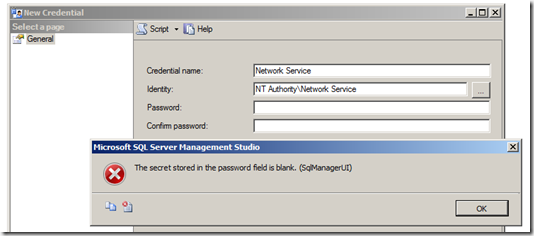
For domain accounts this is fairly straightforward, but if you attempt to add credentials from one of the ‘virtual accounts’ (such as Network Service), you’ll get the following error: “The secret stored in the password field is blank”

image

The solution is (eventually) obvious: add the credential using TSQL (or SMO), and avoid the UI validation:

USE [master]
GO

CREATE CREDENTIAL [Network Service] WITH IDENTITY = N'NT AUTHORITY\NETWORK SERVICE'
GO

et, voila:

image

Saturday, May 26, 2012

vsdbcmd 'built by a runtime newer than the currently loaded runtime and cannot be loaded'

When deploying the latest version of our application to the Production server we got this error:
Unhandled Exception: System.BadImageFormatException: Could not load file or assembly 'vsdbcmd.exe' or one of its dependencies. This assembly is built by a runtime newer than the currently loaded runtime and cannot be loaded. File name: 'vsdbcmd.exe'
Oh god, I thought. Yet more VSDBCMD wierdness. But this box had SQL Server installed, so the normal 'needs SMO / Batch Parser' caveats didn't apply. Eventually I ILSpy'd the assemblies to check the bittyness, and guess what! The error message was completely accurate. I'd accidentally picked up the VSDBCMD not from the VS 2008 folder (9.0) but instead from the VS 2010 folder (10.0). Which is .Net 4. Which really is a more recent version of the runtime than was installed on the Windows 2008 R2 server. Embarrasing to be caught out by a completely accurate error message (though if it listed the versions involved I might have paid attention)

Thursday, May 17, 2012

Analysis Services 2008 R2 breaking change when deploying from the command line

As collegues of mine will attest, I will script anything that has to be deployed. Some things are easier than others.

In the case of Analysis Services, the .asdatabase file that comes out of the build needs to be futher transformed to create the XMLA that you need to run on the server to deploy your (updated) cube definition. Rather than attempt to replicate this transformation, I have previously chosen to get the Analysis Services deployment utility to do this for me, since this can supplied with command line arguments:
write-host "Generating XMLA"
$asDeploy = "$programfiles32\Microsoft SQL Server\90\Tools\Binn\VSShell\Common7\IDE\Microsoft.AnalysisServices.Deployment.exe"
& $asDeploy "$pwd\..\bin\MyCube\MyCube.asdatabase" /d /o:"$pwd\MyCube.xmla"
Which works just nicely. Except when we migrated that project to SQL 2008 R2, when it stopped working.

Well, actually that's not true. We'd been deploying to a 2008 R2 server for ages, it was when we changed the deployment script to use the 2008 version of the deployment tool that it all broke.

Basically the next line in the script kept complaining that 'MyCube.xmla' didn't exist, but I'd look in the folder after the script had run and the file was there. So it seemed like maybe there was a race condition.

Which there was.

If you examine the PE headers for the Sql 2005 version of the deployment util (using a tool like dumpbin) you'll see it's marked as a command line application:

C:\>dumpbin /headers "C:\Program Files (x86)\Microsoft SQL Server\90\Tools\Binn\VSShell\Common7\IDE\Microsoft.AnalysisServices.Deployment.exe" | find /i "subsystem"
            4.00 subsystem version
               3 subsystem (Windows CUI)


...but the 2008 R2 version is marked as a gui application:
C:\>dumpbin /headers "C:\Program Files (x86)\Microsoft SQL Server\100\Tools\Binn\VSShell\Common7\IDE\Microsoft.AnalysisServices.Deployment.exe" | find /i "subsystem"
            4.00 subsystem version
               2 subsystem (Windows GUI)

What? Can't see the difference? One is marked CUI with a 'C', the other is GUI with a 'G'. An unfortunately high degree of visual similarity given what a fundamental difference it makes: launch the first from the command line and you wait for it, launch the second and you don't. When scripting it's pretty important to know which one you've got, or you're going to get race conditiions.

In this case the answer was to control the process launching, so we can explicitly decide to wait:
     start-process -FilePath:$asDeploy -ArgumentList:$asdatabase,"/d","/o:$xmla" -Wait;
Maybe I should just do that all the time to be safe, but just being able to use other command line tools within a script without a whole lot of ceremony is one of the really nice bits about powershell, so I tend not to. In this case the launch semantics of an existing utility changing between versions seems like a really nasty thing to be caught out by.
Good reference sources:
Stack Overflow: Can one executable be both a console and GUI app?
MSDN: A Tour of the Win32 Portable Executable File Format

Monday, May 07, 2012

Sql 2008, virtual accounts and a breaking security change from 2005

Interesting gotcha today regarding the different ways Sql 2005 and Sql 2008 grant permissions to the service account they are running under. Interesting, because the differences broke my app, and exposed my complete lack of understanding of a key Windows 2008 R2 security concept - virtual accounts.
In Sql 2005, to simplfy management of the service account's permissions against SQL itself (specifically with regard to changing which account SQL is running under) the product team started creating local Windows security groups, of the form:
computername\SQLServer2005MSSQLUser$computername$MSSQLSERVER
This group is configured by the installer to contain the service account (eg Network Service), and a corresponding SQL login is created (for the windows group) granting sysadmin rights:


I'm a big fan of running services as Network Service. Not having to create explicit service accounts means less admin overhead (both creation, and password expiry maintanance) and a lower overall attack footprint for your enterprise. But there is a downside - a lack of permissions isolation between services also running as Network Service on the same box. In this case, because of the above, anything else on that box that runs as Network Service is automatically sysadmin on your SQL instance.

In Sql 2008 on Windows 2008 R2 the situation is a bit different, because Windows 2008 R2 introduces so-called virtual accounts. I'm still a bit hazy on these, but one of the things this enables you to do is grant permissions to a service without knowing which account it's running under. The actual permissions the service has at runtime are then the union of permissions explicitly granted to the service account as well as the permissions granted to the service itself.
Which is cool. If a bit freaky at first.
So whilst Sql 2008 still has one of those local Windows groups created for it's service accounts, the contents of this are now, somewhat tautologically:

NT SERVICE\MSSQL$SQL2008

...and at the database level, the group is actually ignored, and the login (and SA grant) is given directly to itself, not the group:


(note: i've got SQL 2008 as a non-default instance, hence the specific naming. But you get the idea).

What does all this mean? Put simply (and somewhat recursively):
  • Only the SQL 2008 service itself is setup as an adminstrator on the SQL 2008 service. The principal (service account) that runs it is not - by itself - an administrator on that instance.
  • It is no longer the case that other applications running under the SQL Server service account are sysadmins on any SQL instances running under those same credentials.
It was the second bullet that broke my app. This is illustrative of poor original design, for sure, but giving Analysis Service carte blanche over the SQL instance on that same box seemed like a fairly safe call originally. But it exposed a really cool security improvement in Windows 2008 R2.

In this case the problem is the solution: I can just go an add a grant for the virtual service account for Analysis Services, give it enough SQL permissions to do what it needs and the problem goes away.

More on virtual accounts from the Sql 2012 doco, and from Technet articles Managed Service Accounts (MSAs) Versus Virtual Accounts in Windows Server 2008 R2 and What's New in Service Accounts

Tuesday, August 16, 2011

Custom Folders in SQL Server Management Studio

It’s about bloody time, but it took a 3rd party to hack it together. This really should be out-of-the-box behaviour.

I like the way he’s used extended properties as the persistence medium, rather than, say, a table with a special name. It’s an approach I’ve used myself for other extensions to the standard schema metadata, like for my Upsert View Generator (which is long overdue an updated post).

Monday, May 23, 2011

More whinging about Hash Aggregate

I previously posted on why Hash Aggregate is to be avoided if possible. Unfortunately Hash Aggregate vs. Stream Aggregate appears to be an ‘all or nothing’ proposal. And that sucks.

A Stream Aggregate can be relatively cheap (in terms of memory pressure) because it can leverage the ordering (typically clustered index ordering) of the input data and aggregate on-the-fly. By contrast the Hash aggregate has to cope with completely disordered data streams, so must buffer all the output aggregates in memory until the input data has been entirely read:

"The other aggregation operator, hash aggregate, is similar to hash join.  It does not require (or preserve) sort order, requires memory, and is blocking (i.e., it does not produce any results until it has consumed its entire input).  Hash aggregate excels at efficiently aggregating very large data sets.”
[Craig Freedman - http://blogs.msdn.com/b/craigfr/archive/2006/09/20/hash-aggregate.aspx ]

This is a good strategy because:

  • It copes with totally unordered data
  • Provided you are aggregating to a significantly higher grain than the source data, the volume of aggregates in the hash (and hence memory consumption) can be relatively small.

In my case, of course, the latter isn’t true: I’m aggregating across a significant amount of data, but not aggregating very much, so I am experiencing vast quantities of tempdb spill.

My input data is partially aligned to the aggregation (the most significant column is sorted correctly), so you’d expect that the aggregation would be able to leverage that smartly, to output aggregates when they were clearly ‘done’. So, for example, if you had a clustered index on Month/Day/Category, and you were doing sum(something) GROUP BY Month, Category, you and I both know that after you’ve finished spooling data for any given month, you can output all those buckets, rather than hang on to them waiting for more. Unfortunately this doesn’t happen, which means given enough data, something will spill to disk:

“if we run out of memory, we must begin spilling rows to tempdb.  We spill one or more buckets or partitions including any partially aggregated results along with any additional new rows that hash to the spilled buckets or partitions”
[Craig’s blog again, same link as before]

One can only hope it’s the older buckets that get spilt first, but even so, when this happens you are taking the IO hit of streaming all that aggregate data to disk and then subsequently loading it all back in again. Ouch. Or you force the stream aggregate (using a hint) and take the pain of the sort. More ouch.

For many workloads this probably isn’t much of an issue, but for my data warehouse this is starting to look like a major, major bottleneck.

Wednesday, March 30, 2011

Avoid Hash Aggregation

I’d been wondering about this, but Simon Sabin’s recent post just spelt it out for me: Hash Aggregation is all too easy to do, but eats performance for breakfast. We’re all used to the problem of SARGable arguments, right? You perform any operations on the parameter not the column in order to correctly hit the indexes you’d expect to hit. So for example you wouldn’t do this:

select blah
from table
where year(datecolumn) = @myyear


but instead you’d do this:

select blah
from table
where datecolumn >= @myyear and datecolumn < dateadd(year, @myyear, 1)


Well exactly the same problem occurs with aggregates, but without the fix. Say datecolum was datetime2(0) – ie down to the second, and you want an annual aggregate of something. For example:

select year(datecolumn) as Year, itemId, sum(cost)
from table
group by year(datecolumn), ItemId


Look what we did. We had to apply the function to the column, and hey presto, despite our underlying table having a clustered index in datecolumn, itemId order, our aggregation is a Hash Aggregation because SQL can’t infer the relationship between a Year and a DateTime. It can’t use Stream Aggregation unless the data is in the right order, which it now can’t infer, and it thinks the hash is going to be cheaper than a full sort.

But Hash Aggregation is expensive, as you only have to read the doco to realise:
For the distinct or aggregate operators, use the input to build the hash table (removing duplicates and computing any aggregate expressions). When the hash table is built, scan the table and output all entries. http://technet.microsoft.com/en-us/library/ms189582.aspx

That hash just buffered all our data in order to do the aggregation. Opps, TempDb spill here we come…

A Stream Aggregation is much more performant because it can perform the aggregation ‘on the fly’ because the data is in order, but to do this in our example we’d have to have a calculated, indexed column ‘Year’, and indexing means it’s persisted, so bang we just added 4 bytes to our fact rows and increased my table size by about 20% (my table is not very wide, but very, very long). And I still need the existing clustered index, so we’re creating a non-clustered index and the relative cost difference for scanning the table might mean we still don’t get what we want.

How much worse is the Hash? I cooked up an example with some of our data against three scenarios:

  • doing an annual aggregate based on munging dates into years (the group by above)

  • doing the aggregate based on adding the year column and putting it in the clustered index

image

88% : 12%. Quite a difference (though the rowcount here is fairly small so this may not be entirely representative).

Ideally Sql would ‘see through’ the Year (and other date related functions) and deduce that it can still use the date-ordered clustered index to service a stream aggregation, and this is exactly what Simon’s opened a Connect issue asking for.

That article seems to suggest that there are workarounds, like joining to the date dimension table and grouping based on columns from that, which I tried in vain. However, this may only be relevant when you’re limiting to a subset of the data. More importantly, this is only viable if the original column was of type Date: if you had a DateTime2(0) you’d need to join against a combined Date-And-Time dimension (getting fairly large). If you had DateTime2(2), you’d need to join against a date dimension that went down to the 100’th of a second. That’s a big dimension (3,153,600,000 rows / year).

Ultimately given my real world scenario is doing lots of aggregations from the sub-minute up to the minute grain, I had to bite the bullet, and change the column in the fact table to smalldatetime (and put the seconds portion in a different column). And that seems like a really poor outcome for what you would have thought would be a bread-and-butter warehousing requirement[1].

Here’s a really excellent write up of the two different operators from Craig Freedman’s blog:


[1] I’m only doing any of this at all because of limitations in SSAS and trying to avoid calc-and-sum performance issues, so it’s all a bit frustrating.

Tuesday, March 29, 2011

Static Lookup Data: Prefer CASE to JOIN when possible

Getting into the nitty-gritty of fine-tuning the datamart I’m working on now, so spending a lot of time looking at execution plans, and wondering ‘why?’. Today: lookup data.

Normally in a datamart you’d denormalize as much as possible, ideally avoiding JOINs altogether, but there’s a trade-off with space and in some cases the space cost just can’t be justified. Sometimes you still have to add some lookup data (cost rates etc…) in your fact view.

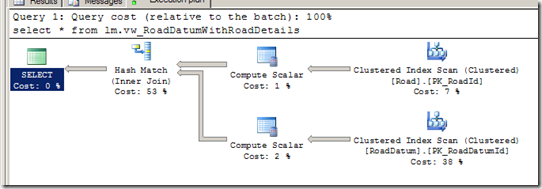
Given a tiny amount of lookup data (10’s of rows), I thought putting it in a little table and doing a join would be pretty performant. The lookup table will basically just sit in RAM all the time, and it’s tiny compared to the fact data so the optimizer can’t possibly it the wrong way round. And I thought searched CASE statements were expensive. Turns out they are nothing on a JOIN, even in the optimal case.

Adding columns using a CASE statement performs significantly better than the static lookup table strategy. Even when the CASE statement is rolled up into a table-valued function, the costs in my case are about 2:1 in favour (the TVF is successfully ‘optimized away’).

In both strategies SQL has to look at each-and-every row, so I’m surprised it’s that different, but I guess maybe the Hash Match is optimized for larger amounts of data (on the right side), and can’t match a CASE for trivial lookups. There’s also the cardinality to consider: a CASE devolves to a COMPUTE SCALAR, which means no change in the number of rows, but a Hash Match might output a row more than once (or drop rows) based on the number of matches on the right side of the query. I’m guessing this constraint means there’s a fundamentally cheaper way to process the data in memory.

Here’s the before and after, with a relatively small number of rows (70,000 on my dev box, but it’s near exactly the same with 100+ million in the test environment):

image

Now you’ll have to excuse me, because I have some views to change…

Friday, March 25, 2011

Enabling Sql Server CLR Integration if not currently enabled

I don’t know, is calling RECONFIGURE unnecessarily an issue? Anyway, if you really want to only enable the integration if it’s not already enabled (and maybe want to do something else at the same time):

DECLARE @config TABLE (
NAME sysname,
minimum INT,
maximum INT,
config_value INT,
run_value int
)

INSERT INTO @config
EXEC sp_configure 'clr enabled'

IF EXISTS (SELECT run_value FROM @config WHERE run_value = 0)
BEGIN
PRINT 'Enabling CLR integration'
EXEC sp_configure 'clr enabled', 1;
RECONFIGURE;
EXEC sp_configure 'clr enabled'
END

Wednesday, March 16, 2011

What bits to download for SQL Cumulative Updates

If you look at the download page for Sql 2008 R2 CU 6, you’ll a choice of six different download packages all for your platform:

image

Whu? Actually it turns out that all but one of these are subset packages of the main hotfix, that you’d only need to apply if – say – you only wanted to patch PowerPivot or SQL Native Client, but you didn’t want to have to download the whole update*.

Quite why this isn’t deemed worth mentioning anywhere in the relevant knowledge base article or on the download page itself is beyond me, but fortunately I happened to stumble upon an article on the SQL CSS team blog that explained it all (after I’d already downloaded half of them) so now I know.

And now, so do you.


[*] Note the rules are different for Sql 2005 – you do have to download all of them. So no potential confusion there.

Monday, November 15, 2010

Column Store Indexes in Sql Server Denali

It’s funny because a college and I were having a discussion in the kitchen the other day about the whole ‘no SQL’ movement, and my point to him was that many of the advantages pertained to having a columnar storage model, and (especially in the light of Vertipaq) I didn’t think it would be long before this kind of storage mode migrated to mainstream RDBMs’s like SQL Server.

And then this, in Denali (Sql Server v-next):

“The columnstore index in SQL Server employs Microsoft’s patented Vertipaq™ technology, which it shares with SQL Server Analysis Services and PowerPivot. SQL Server columnstore indexes don’t have to fit in main memory, but they can effectively use as much memory as is available on the server. Portions of columns are moved in and out of memory on demand.”

MVP’s have been able to download CTP1 for a fortnight apparently, which means Mitch has been holding out on me. Damn his poker face.

Friday, March 26, 2010

Break Back Into Locked Out Sql Instance

This is how to get ‘back into’ a SQL instance when the local administrators group have been ‘locked out’ by not being SYSADMIN on the sql instance (and the SA password has been lost / other admin accounts are unknown / inaccessible)

On more than one occasion people who should know better have flat-out told me that this can’t be done, so just while I have the link handy:

…if SQL Server 2005 is started in single-user mode, any user who has membership in the BUILTIN\Administrators group can connect to SQL Server 2005 as a SQL Server administrator. The user can connect regardless of whether the BUILTIN\Administrators group has been granted a server login that is provisioned in the SYSADMIN fixed server role. This behavior is by design. This behavior is intended to be used for data recovery scenarios.

http://support.microsoft.com/default.aspx?scid=kb;en-us;932881&sd=rss&spid=2855

This is also true for Sql 2008. See Starting SQL Server In Single-User Mode

Wednesday, June 17, 2009

Nasty SSIS 2008 issue with ‘Table or View’ access mode

I’m still not 100% sure I understand this, but here goes:

I swapped one of my packages to use a ‘table or view’ for a data source, rather than (as previously) a named query, and the performance dive-bombed. Think less ‘put the kettle on’, more ‘out for lunch and an afternoon down the pub’.

image

Profiler shows that when you use ‘table or view’, SSIS executes a select * from that_table_or_view on your behalf. But pasting exactly the same select * from profiler into a management studio window still ran pretty good, and completed the query in 3000-odd reads, compared to the 6 million + that SSIS had burnt before I cancelled it.

The view in question is just a straight join of two tables, fairly simple stuff. But profiler showed that SSIS was getting a very different execution plan from running the query in management studio, joining the tables in the opposite (wrong) order. This presumably explains why the number of reads went from 3000-odd to SSIS’s 6 million+. And why it was running a bit s..l..o..w.

Bizarrely even when I put the same select * back into SSIS using ‘Sql Command’ mode, it still ran quickly, provided there was a line break before the FROM. This made me think there must be a bad execution plan getting used somehow, and that extra whitespace was just enough to avoid it:

image

Looking closer at profiler, it appear that when using ‘Table or View’ SSIS first issues the same query with a SET ROWCOUNT 1 on, in order to get the metadata. This doesn’t happen when SSIS uses ‘Sql Command’ as its source: it executes sp_prepare and seems to get all its metadata from that.

So the only conclusion I can come to is that the execution plan is being poisoned by executing it with SET ROWCOUNT 1 on, picking a plan that’s more appropriate for one row than many. In ‘Sql Command’ mode this doesn’t appear to be an issue because SSIS gets the metadata a different way.

Which makes me think I will be avoiding ‘table or view’ like the plague from now on.

[Update 2009-06-19]

For the sake of completeness, here are the extra screenshots I wanted to put in originally, but my screen clipper was playing up (yet again).

Here’s the ‘right’ version you get from management studio or SSIS in ‘SQL Command’ mode (last two columns are ‘READS’ and ‘DURATION’ respectively):

image

image

And here’s what SSIS produces in ‘table or query mode’ (sorry I clipped off the bit above showing it executing the same query with SET ROWCOUNT 1 on, but it did happen):

image

image

…a very different plan.

I thought a good proof here would be to log in as a different user (plans are cached per-user), and execute the equivalent of what SSIS produced:

set rowcount 1
select * from lm.vw_RoadDatumWithRoadDetails
go
set rowcount 0
select * from lm.vw_RoadDatumWithRoadDetails

…unfortunately that didn’t seem to work (or rather fail), so there must be something else in the SSIS preamble that’s also involved in this case :-(

However Microsoft UK’s Simon Sabin has already posted a repro based on the Adventure Works 2008 database (which was pretty quick work). He says:

“Nested loop joins don’t perform if you are processing large numbers of rows, do to the lookup nature”

…which is exactly the strategy I see in the ‘bad’ plan above.

So who’s ‘fault’ is all this? You could make a good case for saying that SQL server should play safe and include the ROWCOUNT as part of its ‘does-a-query-plan-match?’ heuristic (along with a basket of other options it already includes), and that would probably be a good thing generally.

But I think the main question has got to be why does SSIS use SET ROWCOUNT at all? Any time I’ve ever wanted to get metadata I’ve always done a SELECT TOP 0 * FROM x. The ‘top’ is part of the query, so already generates a unique query plan, and it’s not like SSIS has to parse and re-write the query to insert the TOP bit : SSIS is already generating that whole query, based on the ‘table or view’ name: adding the ‘top’ clause would be trivial.

I feel a Connect suggestion coming on.

Tuesday, March 17, 2009

Easy Upserts in SSIS 2005

Merging in updated or newly created data from an external source is a pretty common task in SSIS. The canonical way[1] these upserts are handled is the SSIS Lookup Pattern:

clip_image001

Incoming rows are run through the Lookup component to identify which already exist in the destination. Those that do become UPDATEs, and those that don’t (the Lookup’s error output) become INSERTs. You can further refine this to only retrieve the inserted-or-updated rows from the datasource in the first place and save on bandwidth and so on (a future post on delta loads I think).

It’s fairly straightforward, but to my mind this has a few major problems.

Firstly, it’s a pain in the arse. For something that’s such a common requirement, this seems like a lot of shape-twiddling-clicky-click-dragging to get it up and running[1]. And I hate how brittle the OLE DB Command parameter mapping is. But that’s another story.

More concerning is that the update flow uses the OLE DB Command component, and that’s something that fires per row, unlike the OLE DB Destination that your INSERTs go to, which can batch and/or use fast load. Normally the updates are going to be in the minority compared to the inserts, but if you get a significant number of them it still costs time.

Probably the bigger problem for me with this pattern is that the performance of the lookup degrades as the data volume progressively increases. Every time you insert data there's more for the lookup to subsequently lookup against. You can (and should) limit the columns in the lookup to restrict it's memory blow out, but it's always going to just progressively get worse over time.

To me this is symptomatic that the problem is being solved at the wrong tier. Why bring large quantities of data up from the database to determine 'newness' of a row, when that's clearly something best done closer to the database itself? Especially as both sets of rows are going to the same place anyway.

So then you think about pouring data into a temporary table, then doing the upsert within Sql (based on a join), then dropping the temporary table. But you’ve got to create and drop the temporary table. What you need is a temporary table that’s transparently created for you. And what, after all, is an INSTEAD OF trigger, if not precisely that?

The Upsert View

So my solution for this is a series of 'upsert views'. An upsert view is a view with an INSTEAD OF INSERT trigger that instead of the insert performs an upsert. In this case (being Sql 2005) the upsert is an IF … INSERT … ELSE … UPDATE construct, but a 'true' Sql 2008 upsert would be a minor tweak.

An upsert view looks a bit like this:

Select all-the-updatable-columns
From sometable

Non-updatable columns include timestamp and identity columns (you'd never mark a column you brought in from a source system as an identity column, so there's no need to mess about with identity inserts).

The instead of trigger looks a bit like this:

-- Insert all the genuinely new rows
Insert into [table]
(all-the-updatable-columns)
From
Select (all-the-updatable-columns)
From inserted
Where not exists (select 1 from [table] where (keys=inserted.keys)

-- Update all the modified rows
Update [table]
Set all-the-updatable-columns=inserted.all-the-updatable-columns
From
Inserted
Inner join [table] on (keys = inserted.keys)
Where (concurrency_indicators <> inserted.concurrency_indicators)

(We’ll explain the keys and the concurrency indicators in a moment)

What this produces is a view over your data table that takes records INSERTED into the view and performs an UPSERT into the base table. As a result your SSIS can be simplified to this:


clip_image002


In reality of course you normally have more than this: probably have some other lookups and some data type conversions. However you've not had to put the Upsert functionality into the SSIS (by hand): instead the database is handling it all for you.

Provided you enable the FIRE_TRIGGERS option, this is entirely compatible with using Fast Load, and this can make a significant performance difference for the time of your package execution. You've kept all the row-matching down in Sql where it can use indexes, optimisations and the page cache, and you've reduced the memory footprint of your SSIS packages. I shame myself by not having any hard comparison data to back this up however.

We (of course) generate[2] these upsert views based on various bits of metadata we store to indicate which are the keys and the concurrency indicators. In a data warehouse it’s quite common for the primary key to be different to that defined in the source system, so the key used for row matching – the ‘business key’ – has to be indicated somewhere. Column-level extended properties seemed a fairly natural fit:

clip_image003

Similarly the columns that are used for concurrency control – rowversion / datetime updated – are marked as follows:

clip_image004

(If you don’t have one then you use the ‘fallback’ concurrency model that so many of Microsoft’s design-time tools like to kick out: you compare every column to see if it’s changed (mark all non-key columns). This is clearly a bit yuck).

And that’s pretty much it. Provided you can cope with INSERTing into a view and getting UPDATEs to your table, (which is a bit odd, but can be catered for with appropriate naming conventions) then maybe you can benefit from this approach too.

[1] Sometimes you can get the Slowly Changing Dimension wizard to kick out something similar, but that’s pretty hacky, and doesn’t like using certain types of columns as the update indicator (IRRC). It also re-creates the downstream flow every time you open it, which obviously removes any customisations you make. Avoid.
[2] The generation process was a fairly simple PowerShell script. I’ll post the important bits up one day.

Friday, February 27, 2009

GDR Grrr...

I've totally had it with Visual Studio Database Edition 2008 GDR.
CREATE VIEW [dbo].[DateRangeExpanded] WITH SCHEMABINDING
AS
select n.Number, n.Date
from dbo.Numbers n
where n.Date >= CONVERT(DATETIME,'2007-12-01') and
n.Date <= datediff(day, 0, DATEADD(MONTH, 6, GETDATE()))
Results in
Error TSD03127: Cannot schema bind view '[dbo].[DateRangeExpanded]'
because name 'DATETIME' is invalid for schema binding. Names must be in two-part format and an object cannot reference itself.
WFT? SQL Server is quite happy with the above, it's just GDR getting it's knickers in a twist yet again: DateTime is a type not a column. I have found no way of making it happy with this one[1], other than taking the schemabinding off, and I am pretty pissed about limiting my database design just to accommodate GDR's inadequacies.

If this project wasn't finishing up in a few weeks, GDR would be in the bin by now.


[1] CAST vs CONVERT doesn't make any difference, for one thing.

Thursday, February 12, 2009

Substituting view/synonym causes naming collisions in Database Edition GDR

The other day we discovered a duplicated table in the database. We're doing some refactoring, and a certain amount of duplication during this process is inevitable, but to cut a long story short, the two instances of this table needed collapsing into one.

So I dropped one instance, and created a synonym in it's place (pointing to the other). This saves fixing all the views and external references (in the SSAS cube) to that table. Those references will go away over time.

But when I tried to sync the database using GDR it just didn't get it. It's quite happy to create the new synonym, just too dumb to drop the original table first - so there's a naming collision I had to fix by hand. It basically does this:

CREATE SYNONYM [dbo].[Table_2] FOR [dbo].[Table_1];
GO
DROP TABLE [dbo].[Table_2];

Dur! And it does the same thing if you substitute a view for a table too:


CREATE VIEW [dbo].[Table_2]
AS
-- Create view instead of original table
SELECT One FROM dbo.Table_1;

GO
-- Drop original table
DROP TABLE [dbo].[Table_2];
Anyone see the problem here? This is not an edge case guys.

I should point out that this only happens when sync'ing a database with the database model. If you sync two live databases, GDR gets the execution order right.

Not impressed.

(By way of comparison Sql Compare 7 is quite happy with both these scenarios, whether comparing against a live database or a snapshot. Drop table; create synonym - it's not that hard. And Sql Compare 7's been out a while (8 is nearly out))


[Update: 2008-02-20] And another thing: GDR's idea of dropping an object (eg: if you sync to a dev database and the object isn't there any more) is to comment out the object definition in the database project. All well and good, but it's too stupid to also comment out any extended properties the object might have (say the ones the view designer put in to store the view layout), so obviously those extended properties cause the build to crap out as the object they reference doesn't exist.

Popular Posts