I can’t believe I’ve never found this page on MSDN before (and not for lack of searching). It’s a mapping between SSIS data types and underlying types in common providers like SQL and Oracle:
Showing posts with label SSIS. Show all posts
Showing posts with label SSIS. Show all posts
Tuesday, December 15, 2009

Wednesday, June 17, 2009
Nasty SSIS 2008 issue with ‘Table or View’ access mode
I’m still not 100% sure I understand this, but here goes:
I swapped one of my packages to use a ‘table or view’ for a data source, rather than (as previously) a named query, and the performance dive-bombed. Think less ‘put the kettle on’, more ‘out for lunch and an afternoon down the pub’.

Profiler shows that when you use ‘table or view’, SSIS executes a select * from that_table_or_view on your behalf. But pasting exactly the same select * from profiler into a management studio window still ran pretty good, and completed the query in 3000-odd reads, compared to the 6 million + that SSIS had burnt before I cancelled it.
The view in question is just a straight join of two tables, fairly simple stuff. But profiler showed that SSIS was getting a very different execution plan from running the query in management studio, joining the tables in the opposite (wrong) order. This presumably explains why the number of reads went from 3000-odd to SSIS’s 6 million+. And why it was running a bit s..l..o..w.
Bizarrely even when I put the same select * back into SSIS using ‘Sql Command’ mode, it still ran quickly, provided there was a line break before the FROM. This made me think there must be a bad execution plan getting used somehow, and that extra whitespace was just enough to avoid it:

Looking closer at profiler, it appear that when using ‘Table or View’ SSIS first issues the same query with a SET ROWCOUNT 1 on, in order to get the metadata. This doesn’t happen when SSIS uses ‘Sql Command’ as its source: it executes sp_prepare and seems to get all its metadata from that.
So the only conclusion I can come to is that the execution plan is being poisoned by executing it with SET ROWCOUNT 1 on, picking a plan that’s more appropriate for one row than many. In ‘Sql Command’ mode this doesn’t appear to be an issue because SSIS gets the metadata a different way.
Which makes me think I will be avoiding ‘table or view’ like the plague from now on.
[Update 2009-06-19]
For the sake of completeness, here are the extra screenshots I wanted to put in originally, but my screen clipper was playing up (yet again).
Here’s the ‘right’ version you get from management studio or SSIS in ‘SQL Command’ mode (last two columns are ‘READS’ and ‘DURATION’ respectively):

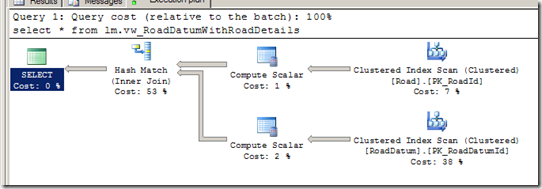
And here’s what SSIS produces in ‘table or query mode’ (sorry I clipped off the bit above showing it executing the same query with SET ROWCOUNT 1 on, but it did happen):


…a very different plan.
I thought a good proof here would be to log in as a different user (plans are cached per-user), and execute the equivalent of what SSIS produced:
set rowcount 1
select * from lm.vw_RoadDatumWithRoadDetails
go
set rowcount 0
select * from lm.vw_RoadDatumWithRoadDetails
…unfortunately that didn’t seem to work (or rather fail), so there must be something else in the SSIS preamble that’s also involved in this case :-(
However Microsoft UK’s Simon Sabin has already posted a repro based on the Adventure Works 2008 database (which was pretty quick work). He says:
“Nested loop joins don’t perform if you are processing large numbers of rows, do to the lookup nature”
…which is exactly the strategy I see in the ‘bad’ plan above.
So who’s ‘fault’ is all this? You could make a good case for saying that SQL server should play safe and include the ROWCOUNT as part of its ‘does-a-query-plan-match?’ heuristic (along with a basket of other options it already includes), and that would probably be a good thing generally.
But I think the main question has got to be why does SSIS use SET ROWCOUNT at all? Any time I’ve ever wanted to get metadata I’ve always done a SELECT TOP 0 * FROM x. The ‘top’ is part of the query, so already generates a unique query plan, and it’s not like SSIS has to parse and re-write the query to insert the TOP bit : SSIS is already generating that whole query, based on the ‘table or view’ name: adding the ‘top’ clause would be trivial.
I feel a Connect suggestion coming on.
Tuesday, March 17, 2009
Easy Upserts in SSIS 2005
Merging in updated or newly created data from an external source is a pretty common task in SSIS. The canonical way[1] these upserts are handled is the SSIS Lookup Pattern:

Incoming rows are run through the Lookup component to identify which already exist in the destination. Those that do become UPDATEs, and those that don’t (the Lookup’s error output) become INSERTs. You can further refine this to only retrieve the inserted-or-updated rows from the datasource in the first place and save on bandwidth and so on (a future post on delta loads I think).
It’s fairly straightforward, but to my mind this has a few major problems.
Firstly, it’s a pain in the arse. For something that’s such a common requirement, this seems like a lot of shape-twiddling-clicky-click-dragging to get it up and running[1]. And I hate how brittle the OLE DB Command parameter mapping is. But that’s another story.
More concerning is that the update flow uses the OLE DB Command component, and that’s something that fires per row, unlike the OLE DB Destination that your INSERTs go to, which can batch and/or use fast load. Normally the updates are going to be in the minority compared to the inserts, but if you get a significant number of them it still costs time.
Probably the bigger problem for me with this pattern is that the performance of the lookup degrades as the data volume progressively increases. Every time you insert data there's more for the lookup to subsequently lookup against. You can (and should) limit the columns in the lookup to restrict it's memory blow out, but it's always going to just progressively get worse over time.
To me this is symptomatic that the problem is being solved at the wrong tier. Why bring large quantities of data up from the database to determine 'newness' of a row, when that's clearly something best done closer to the database itself? Especially as both sets of rows are going to the same place anyway.
So then you think about pouring data into a temporary table, then doing the upsert within Sql (based on a join), then dropping the temporary table. But you’ve got to create and drop the temporary table. What you need is a temporary table that’s transparently created for you. And what, after all, is an INSTEAD OF trigger, if not precisely that?
The Upsert View
So my solution for this is a series of 'upsert views'. An upsert view is a view with an INSTEAD OF INSERT trigger that instead of the insert performs an upsert. In this case (being Sql 2005) the upsert is an IF … INSERT … ELSE … UPDATE construct, but a 'true' Sql 2008 upsert would be a minor tweak.
An upsert view looks a bit like this:
Select all-the-updatable-columns
From sometable
Non-updatable columns include timestamp and identity columns (you'd never mark a column you brought in from a source system as an identity column, so there's no need to mess about with identity inserts).
The instead of trigger looks a bit like this:
-- Insert all the genuinely new rows
Insert into [table]
 (all-the-updatable-columns)
From
 Select (all-the-updatable-columns)
 From inserted
 Where not exists (select 1 from [table] where (keys=inserted.keys)

-- Update all the modified rows
Update [table]
 Set all-the-updatable-columns=inserted.all-the-updatable-columns
From
 Inserted
 Inner join [table] on (keys = inserted.keys)
Where (concurrency_indicators <> inserted.concurrency_indicators)
(We’ll explain the keys and the concurrency indicators in a moment)
What this produces is a view over your data table that takes records INSERTED into the view and performs an UPSERT into the base table. As a result your SSIS can be simplified to this:

In reality of course you normally have more than this: probably have some other lookups and some data type conversions. However you've not had to put the Upsert functionality into the SSIS (by hand): instead the database is handling it all for you.
Provided you enable the FIRE_TRIGGERS option, this is entirely compatible with using Fast Load, and this can make a significant performance difference for the time of your package execution. You've kept all the row-matching down in Sql where it can use indexes, optimisations and the page cache, and you've reduced the memory footprint of your SSIS packages. I shame myself by not having any hard comparison data to back this up however.
We (of course) generate[2] these upsert views based on various bits of metadata we store to indicate which are the keys and the concurrency indicators. In a data warehouse it’s quite common for the primary key to be different to that defined in the source system, so the key used for row matching – the ‘business key’ – has to be indicated somewhere. Column-level extended properties seemed a fairly natural fit:

Similarly the columns that are used for concurrency control – rowversion / datetime updated – are marked as follows:

(If you don’t have one then you use the ‘fallback’ concurrency model that so many of Microsoft’s design-time tools like to kick out: you compare every column to see if it’s changed (mark all non-key columns). This is clearly a bit yuck).
And that’s pretty much it. Provided you can cope with INSERTing into a view and getting UPDATEs to your table, (which is a bit odd, but can be catered for with appropriate naming conventions) then maybe you can benefit from this approach too.
[1] Sometimes you can get the Slowly Changing Dimension wizard to kick out something similar, but that’s pretty hacky, and doesn’t like using certain types of columns as the update indicator (IRRC). It also re-creates the downstream flow every time you open it, which obviously removes any customisations you make. Avoid.
[2] The generation process was a fairly simple PowerShell script. I’ll post the important bits up one day.
Friday, March 06, 2009
Oracle OLE DB provider precision issues with SSIS 2005
We had this problem[3] before where SSIS would keep complaining that the Oracle client wasn’t giving it the correct precision information for numeric columns:
Error at Import Broken Stock On Hand Levels [DTS.Pipeline]: The "output column "WORKD_TONNES" (42)" has a precision that is not valid. The precision must be between 1 and 38.
We were using Oracle 9r2 client + OLE DB provider against an Oracle 8 database, and I just assumed that one of those wasn’t passing though metadata it should have, leaving SSIS to see the precision and scale as 0:

You can explicitly set the scale/precision in the advanced editor, but it keeps wanting to overwrite it every time you look at the query, which is a major pain in the arse. And explicitly TRUNCing or ROUNDing the column in the source query doesn’t seem to make any difference, even while you’d think that would make the precision explicit. So instead we used the Microsoft OLE DB Provider for Oracle (MSDAORA), and everything was happy.
Well nearly.
Actually it turns out that rather than MSDAORA ‘working’, all it actually does is default the precision and scale as 38,0 in scenarios where it can’t determine the precision/scale. And this happens rather a lot, since an Oracle Numeric doesn’t actually have to have a length or precision specified (though it should): it can be some kind of wierd variable precision float/numerical hybrid, which isn’t something that SSIS 2005 really caters for (nor other parts of Sql for that matter). Anyway, the point is that 38,0 isn’t the right answer either: whilst it’s fine for integer data anything after the decimal is lost, and that can take a while to pick up on.
So I’m not sure which is worse. On the one hand you can use the Oracle OLE DB driver, and all your precisions will be wrong until you fix them, but at least it’s in your face enough you know about it (though sometimes you can’t even OK the dialog, to get into the advanced editor and fix it, and/or it whinges about mis-matches with error output columns).
On the other hand the Microsoft driver makes a good stab at ‘what you probably want’, but as a result you lose precision on decimal data. And even if you set the precision up, it’ll overwrite it again (silently) when you touch the query, so it can go from working to not very inconspicously.
Probably the only safe way here is to use the Microsoft driver, and modify all your queries to cast all non-integer variable Numeric columns to strings[2]. That way the conversion into decimal data has to be explicitly defined, and can’t be lost quite as easily. It’s a bit more work of course, but at least the output is right.
Which brings me back to why I started looking at this again because there is no 64 bit version of MSDAORA [1] (I’m not even sure if MSDAORA is actively supported anymore), and we’ve had all manner of fun getting the 32 bit version running talking to either of the 32 and 64 bit versions of the Oracle client. We failed, but I may have just configured it wrong.
So instead we are in this ridiculous situation where we use MSDAORA at design time, and the Oracle OLE DB driver on the server at execution time, which creates all manner of warnings in the logs and also means some Sql (with inline comments) works on a developers machine but doesn’t work on the server.
It’s a mess.
[1] Nor Jet either, if you were crazy enough to load something from an Excel file. Who would do such a thing?
[2] Interestingly this is exactly how SSIS 2008 gets round this problem: it gives up, maps the variable-Numeric column as a string and leaves the conversion up to you
[3] Obviously the first problem we had was the whinging about the DefaultCodePage issue
[4] Managed to get all the footnotes in backwards for this post, which is pretty poor.
Sunday, March 01, 2009
Consistency in SSIS
It just occurred to me that the Derived Column Transformation editor (and other SSIS expressions) take a C (ie C#) style approach to equality:

…whereas SSIS 2005 can only use VB.Net for Script Tasks / Components.
Go figure.
[ok, yeah, fixed in SSIS 2008. I know. Lucky you]
Subscribe to:
Posts (Atom)

 Posts
Posts


