Whilst I was unwrapping my other presents, Microsoft RTM’d Windows 7 and Powershell 2. Just for me! You shouldn’t have, etc… Only, apparently I can’t unwrap it until Aug 6th.
But who to send the ‘thank you’ to?
Ever wondered what exactly makes a project a test project from the perspective of the VS IDE? Or – to put it another way – did you ever right click on a test and ‘Run Tests’ wasn’t there?

Turns out it’s just a case of this being in the primary PropertyGroup for the project:
<ProjectTypeGuids>{3AC096D0-A1C2-E12C-1390-A8335801FDAB};{FAE04EC0-301F-11D3-BF4B-00C04F79EFBC}</ProjectTypeGuids>
(that and the reference to Microsoft.VisualStudio.QualityTools.UnitTestFramework, but you had that already right?)
This is WiX:
candle.exe
dark.exe
heat.exe
light.exe
lit.exe
melt.exe
pyro.exe
smoke.exe
torch.exe
Jesus wept. Even the ‘fresh ground .jar of Java beans’ crowd outgrew this childishness…
I’m still not 100% sure I understand this, but here goes:
I swapped one of my packages to use a ‘table or view’ for a data source, rather than (as previously) a named query, and the performance dive-bombed. Think less ‘put the kettle on’, more ‘out for lunch and an afternoon down the pub’.

Profiler shows that when you use ‘table or view’, SSIS executes a select * from that_table_or_view on your behalf. But pasting exactly the same select * from profiler into a management studio window still ran pretty good, and completed the query in 3000-odd reads, compared to the 6 million + that SSIS had burnt before I cancelled it.
The view in question is just a straight join of two tables, fairly simple stuff. But profiler showed that SSIS was getting a very different execution plan from running the query in management studio, joining the tables in the opposite (wrong) order. This presumably explains why the number of reads went from 3000-odd to SSIS’s 6 million+. And why it was running a bit s..l..o..w.
Bizarrely even when I put the same select * back into SSIS using ‘Sql Command’ mode, it still ran quickly, provided there was a line break before the FROM. This made me think there must be a bad execution plan getting used somehow, and that extra whitespace was just enough to avoid it:

Looking closer at profiler, it appear that when using ‘Table or View’ SSIS first issues the same query with a SET ROWCOUNT 1 on, in order to get the metadata. This doesn’t happen when SSIS uses ‘Sql Command’ as its source: it executes sp_prepare and seems to get all its metadata from that.
So the only conclusion I can come to is that the execution plan is being poisoned by executing it with SET ROWCOUNT 1 on, picking a plan that’s more appropriate for one row than many. In ‘Sql Command’ mode this doesn’t appear to be an issue because SSIS gets the metadata a different way.
Which makes me think I will be avoiding ‘table or view’ like the plague from now on.
[Update 2009-06-19]
For the sake of completeness, here are the extra screenshots I wanted to put in originally, but my screen clipper was playing up (yet again).
Here’s the ‘right’ version you get from management studio or SSIS in ‘SQL Command’ mode (last two columns are ‘READS’ and ‘DURATION’ respectively):

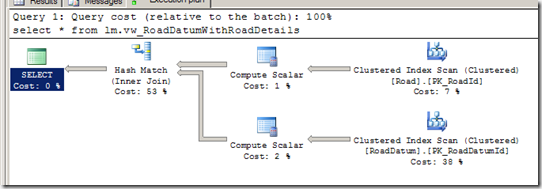
And here’s what SSIS produces in ‘table or query mode’ (sorry I clipped off the bit above showing it executing the same query with SET ROWCOUNT 1 on, but it did happen):


…a very different plan.
I thought a good proof here would be to log in as a different user (plans are cached per-user), and execute the equivalent of what SSIS produced:
set rowcount 1
select * from lm.vw_RoadDatumWithRoadDetails
go
set rowcount 0
select * from lm.vw_RoadDatumWithRoadDetails
…unfortunately that didn’t seem to work (or rather fail), so there must be something else in the SSIS preamble that’s also involved in this case :-(
However Microsoft UK’s Simon Sabin has already posted a repro based on the Adventure Works 2008 database (which was pretty quick work). He says:
“Nested loop joins don’t perform if you are processing large numbers of rows, do to the lookup nature”
…which is exactly the strategy I see in the ‘bad’ plan above.
So who’s ‘fault’ is all this? You could make a good case for saying that SQL server should play safe and include the ROWCOUNT as part of its ‘does-a-query-plan-match?’ heuristic (along with a basket of other options it already includes), and that would probably be a good thing generally.
But I think the main question has got to be why does SSIS use SET ROWCOUNT at all? Any time I’ve ever wanted to get metadata I’ve always done a SELECT TOP 0 * FROM x. The ‘top’ is part of the query, so already generates a unique query plan, and it’s not like SSIS has to parse and re-write the query to insert the TOP bit : SSIS is already generating that whole query, based on the ‘table or view’ name: adding the ‘top’ clause would be trivial.
I feel a Connect suggestion coming on.
The default TFS drop folder scheme is a train-wreck where all the binaries and output files from the entire solution are summarily dumped into a single folder (albeit with some special-case handling for websites). Its just gross.
What I wanted, of course, was a series of folders by project containing only the build artefacts relevant for that project: ‘xcopy ready’ as I like to say. Pretty sensible yes? Quite a popular request if one Googles around: one wonders why the train-wreck scheme was implemented at all. But I digress.
Contrary to what you (and I) may have read, you actually have to do this using AfterBuild, not AfterCompile (which fires way too early in the build process[1]). So the canned solution is:
Put this in your TFSBuild.proj:
<PropertyGroup>
<CustomizableOutDir>true</CustomizableOutDir>
<!-- TEAM PROJECT
(this turns off the ‘train-wreck’ scheme, and goes back to each project’s output going to their bin\debug or whatever folder)
Put this in any project file that you want to capture the output from:
<Target Name="AfterBuild" Condition=" '$(IsDesktopBuild)'!='true' ">
<Message Text="Copying output files from $(OutDir) to $(TeamBuildOutDir)" />
<ItemGroup>
<FilesToCopy Include="$(OutDir)\**\*.*" />
</ItemGroup>
<Copy SourceFiles="@(FilesToCopy)" DestinationFiles="@(FilesToCopy ->'$(TeamBuildOutDir)\$(AssemblyName)\%(RecursiveDir)%(Filename)%(Extension)')" />
</Target>
And hey presto:

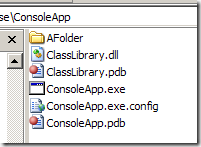
A series of output folders, by assembly, containing only the artefacts relevant to that assembly, as opposed to the
Note however that with this scheme you get all files marked ‘Copy to Output Directory’ but not files marked as Content, which makes this currently unusable for deploying websites and means it’s not strictly speaking xcopy-ready[2]. Hopefully there is an easy fix to this, otherwise I’ll be diving back into the SNAK codebase where I’ve solved this previously.
[1] before serialization assemblies are generated, and before the obj folder has been copied to the bin folder. A good diagnostic is to put <Exec Command="dir" WorkingDirectory="$(OutDir)"/> into an AfterCompile target, and take a look at what you get back.
[2] I have a big thing about this, which is why I dislike the ClickOnce build output so much. Build and deploy need to be considered separately.
Here at work we have our profiles, including our documents folders, remoted to the network. It’s a constant pain, and this morning the fun was how to get the CopySourceAsHTML visual studio Add-in working as a result, since its ‘normal’ install location, My Documents\Visual Studio 2008\AddIn’ is within that remoted profile.
Irrespective of fiddling around with CASPOL and security zones, Visual Studio seems intransigent in not wanting to load AddIns from network locations. Fortunately it turns out there are a number of different places that you can put add-ins to get them to load, which is probably better explained in this conversation.
As a result I dumped the addin into
%ALLUSERSPROFILE%\Application Data\Microsoft\VisualStudio\9.0\AddIns
C:\Documents and Settings\All Users\Application Data\Microsoft\VisualStudio\9.0\AddIns
…and it worked just fine.
Shows how often I actually refer back to those DVDs, but now that Silverlight 2 is out they don’t work (well the navigation doesn’t, which is nearly as bad)
There are a number of crappy workarounds, but fortunately at least one clever fix (short of re-authoring the DVDs with the updated online content). Naively I thought you could just add the application/x-silverlight-2-b2 mime-type mapping into the registry and it would work, but apparently not.
The Silverlight version detection / browser sniffing / forwards compatibility story has been monumentally shite so far, because I’ve seen a whole heap of the ‘Install Silverlight’ button in lieu of content, but immortalizing it onto countless DVDs really takes the biscuit.
Flash – if I recall correctly – got this right first time, that being over a decade ago.
Yeah, so your fancy-pants Linq query, and your fluent interface all looks so neat and expressive, but after you’ve tried to play ‘pin the null reference exception on the donkey’ in production for the n’th time you might consider that all those intermediate variables were generally considered good style for a reason. And it’s not just that you can pinpoint an error given a line number:
“Putting each statement on a line of its own provides an accurate view of a program’s complexity” – Steve McConnell [1]
That and naming the variables documented the code[2], right?
Everyone’s oooohh so up in arms if a method spans multiple pages on screen, but a 10 line fluent interface chain mixed with some linq and some lambdas is somehow ok!? Be serious now[3].
Dumb it down. One day you will appreciate it.
[1] Code Complete, Chapter 31.5 Para ‘Using Only One Statement Per Line’. See http://www.cc2e.com/Page.aspx?hid=291
[2] …and chapter 11.1 ‘Considerations in Choosing Good Names’
[3] Not that I’m advocating avoiding either Linq or Lambdas, but moderation in everything, right? Really not sold at all on Fluent Interfaces mind. So last year.
Merging in updated or newly created data from an external source is a pretty common task in SSIS. The canonical way[1] these upserts are handled is the SSIS Lookup Pattern:
Incoming rows are run through the Lookup component to identify which already exist in the destination. Those that do become UPDATEs, and those that don’t (the Lookup’s error output) become INSERTs. You can further refine this to only retrieve the inserted-or-updated rows from the datasource in the first place and save on bandwidth and so on (a future post on delta loads I think).
It’s fairly straightforward, but to my mind this has a few major problems.
Firstly, it’s a pain in the arse. For something that’s such a common requirement, this seems like a lot of shape-twiddling-clicky-click-dragging to get it up and running[1]. And I hate how brittle the OLE DB Command parameter mapping is. But that’s another story.
More concerning is that the update flow uses the OLE DB Command component, and that’s something that fires per row, unlike the OLE DB Destination that your INSERTs go to, which can batch and/or use fast load. Normally the updates are going to be in the minority compared to the inserts, but if you get a significant number of them it still costs time.
Probably the bigger problem for me with this pattern is that the performance of the lookup degrades as the data volume progressively increases. Every time you insert data there's more for the lookup to subsequently lookup against. You can (and should) limit the columns in the lookup to restrict it's memory blow out, but it's always going to just progressively get worse over time.
To me this is symptomatic that the problem is being solved at the wrong tier. Why bring large quantities of data up from the database to determine 'newness' of a row, when that's clearly something best done closer to the database itself? Especially as both sets of rows are going to the same place anyway.
So then you think about pouring data into a temporary table, then doing the upsert within Sql (based on a join), then dropping the temporary table. But you’ve got to create and drop the temporary table. What you need is a temporary table that’s transparently created for you. And what, after all, is an INSTEAD OF trigger, if not precisely that?
So my solution for this is a series of 'upsert views'. An upsert view is a view with an INSTEAD OF INSERT trigger that instead of the insert performs an upsert. In this case (being Sql 2005) the upsert is an IF … INSERT … ELSE … UPDATE construct, but a 'true' Sql 2008 upsert would be a minor tweak.
An upsert view looks a bit like this:
Select all-the-updatable-columns
From sometable
Non-updatable columns include timestamp and identity columns (you'd never mark a column you brought in from a source system as an identity column, so there's no need to mess about with identity inserts).
The instead of trigger looks a bit like this:
-- Insert all the genuinely new rows
Insert into [table]
 (all-the-updatable-columns)
From
 Select (all-the-updatable-columns)
 From inserted
 Where not exists (select 1 from [table] where (keys=inserted.keys)

-- Update all the modified rows
Update [table]
 Set all-the-updatable-columns=inserted.all-the-updatable-columns
From
 Inserted
 Inner join [table] on (keys = inserted.keys)
Where (concurrency_indicators <> inserted.concurrency_indicators)
(We’ll explain the keys and the concurrency indicators in a moment)
What this produces is a view over your data table that takes records INSERTED into the view and performs an UPSERT into the base table. As a result your SSIS can be simplified to this:
In reality of course you normally have more than this: probably have some other lookups and some data type conversions. However you've not had to put the Upsert functionality into the SSIS (by hand): instead the database is handling it all for you.
Provided you enable the FIRE_TRIGGERS option, this is entirely compatible with using Fast Load, and this can make a significant performance difference for the time of your package execution. You've kept all the row-matching down in Sql where it can use indexes, optimisations and the page cache, and you've reduced the memory footprint of your SSIS packages. I shame myself by not having any hard comparison data to back this up however.
We (of course) generate[2] these upsert views based on various bits of metadata we store to indicate which are the keys and the concurrency indicators. In a data warehouse it’s quite common for the primary key to be different to that defined in the source system, so the key used for row matching – the ‘business key’ – has to be indicated somewhere. Column-level extended properties seemed a fairly natural fit:

Similarly the columns that are used for concurrency control – rowversion / datetime updated – are marked as follows:

(If you don’t have one then you use the ‘fallback’ concurrency model that so many of Microsoft’s design-time tools like to kick out: you compare every column to see if it’s changed (mark all non-key columns). This is clearly a bit yuck).
And that’s pretty much it. Provided you can cope with INSERTing into a view and getting UPDATEs to your table, (which is a bit odd, but can be catered for with appropriate naming conventions) then maybe you can benefit from this approach too.
[1] Sometimes you can get the Slowly Changing Dimension wizard to kick out something similar, but that’s pretty hacky, and doesn’t like using certain types of columns as the update indicator (IRRC). It also re-creates the downstream flow every time you open it, which obviously removes any customisations you make. Avoid.
[2] The generation process was a fairly simple PowerShell script. I’ll post the important bits up one day.
Please stop printing your product labels, serial numbers and OEM certificate of authenticity stickers in sweat soluble ink, then fixing them to the underside of our laptops.
Yours: everyone who ever actually used a laptop on their lap, or handled it using their hands.

Hey did you see that thing that guy did where he brute-forced blur-redacted text back into plaintext? That was pretty cool. Damned if I can find the link again mind…
I’ve been using Reporting Services 2005 to build a series of BI dashboards, initially using the SharePoint reports library, but more recently using straight ASP.Net pages. In essence we’ve been using SSRS as a headless charting engine.
On some of our dashboards we occasionally saw little red crosses rather than our charts – IE’s way of telling us the image hadn’t loaded. Didn’t happen very often, and at the time we had bigger fish to fry, but unfortunately when we moved to our big new multi-core server, it happened a lot more.
In the logs we saw a lot of this:
w3wp!library!f!01/21/2009-12:40:25:: Call to GetItemTypeAction(http://myserver/reports/BlahBlahReport.rdl).
w3wp!library!f!01/21/2009-12:40:26:: e ERROR: Throwing Microsoft.ReportingServices.Diagnostics.Utilities.StreamNotFoundException: The stream cannot be found. The stream identifier that is provided to an operation cannot be located in the report server database., ;
Hotfix 913363 looked promising, but that was included in SP1, and we were SP3, so unless it had regressed, that wasn’t going to help.
What we determined was that this only happened when the same user requested the same report multiple times (with different parameters) at more or less the same time. And that happens a fair bit for us: our dashboards (both the SharePoint versions, and the later ASP.Net ones) basically rendered down to pages of IFRAMES pointing back at SSRS, and sometimes multiple charts on one dashboard would actually just be the same report re-executed with different parameters. So my ‘race condition’ alarm was off and running.
For any report on the dashboard, IE does this:
Any generated images in the report have to be cached momentarily on the server between when the HTML is generated, and when the browser comes and ask for them. And of course the browser has to supply some kind of reference back to the server so it gets the right images, and not the images from a different report or a what a different user is viewing. So there’s a Reporting Services Session (which you probably read about the first time you got a rsExecutionContextNotFound exception, right?).
So we speculated that SSRS was getting its sessions in a mess, and somehow a subsequent request to the same report, using different parameters, was throwing away the results of the previous execution (the chart image we are after) in the process of creating a new one. At which point Graeme discovered you can disable session cookies (in the ConfigurationInfo table) which (after an IISReset) indeed fixed the problem entirely.
But why the problem in the first place?
Looking at the HTTP traffic between the browser and the server, one sees that the scoping of the image request is indeed only scoped to an imageID and report as part of the GET url, and within a execution session as part of a cookie:
GET /ReportServer?BlahBlahReport&rs%3aFormat=HTML4.0&rs%3aImageID=d95ebcc7-deba-4734-93c9-270468bd133b HTTP/1.1
Cookie: ConsoleVisible5dd14218-294b-424e-a33a-013236be5290=false; RSExecutionSession%3ahttp%3a%2f%2fserver%2f%2fBlahBlahReport=54m0qr55hytlvn55nzkjxr55
I’ve not followed this through entirely, but basically the trouble is your browser only has one RSExecutionSession cookie, which appears to contains only one execution ID per report URI. You’d imagine then that what you’d get is just the wrong image (outstanding requests for images from the first execution are submitted using the execution ID from the second session), but you don’t, so the most likely scenario I can come up with is that starting the second execution for the report implicitly removes the artefacts (images etc…) still in cache from the first execution. If this happens before the browser’s loaded them then it’s little broken crosses time…
Once you turn cookieless sessions on, however, the GET requests look more like this:
GET /ReportServer?%2fBlahBlahReport&rs%3aSessionID=ucqtvo55wacqugqjln3l2045&rs%3aFormat=HTML4.0&rs%3aImageID=e9a2d08b-23cb-4586-8399-eb42ed5558a7 HTTP/1.1
ie they contain all three of report, execution and image. As such executing the same report multiple times in parallel doesn’t create any race conditions. This seems like such a better way of doing it that I’m surprised this isn’t the default behaviour (I guess it can’t clean up the temporary cache quite as aggressively, but other than that I can’t see the downside).
It’s worth noting that this kind of thing is an absolutely classic pitfall with any form of HTTP session state, which application frameworks like ASP and ASP.Net typically sidestep by serializing requests within a session and thus avoiding order-of-execution issues. However in this case, even if SSRS serialized access it would have to ensure it serialized it in the right sequence to really fix the problem. Tricky.
PS: Reporting Services 2005. Haven’t tested on 2008.
I went out and bought a nice new HP Touchsmart TX2 the other day. And I’ve been very happy with it. For one thing I’ve hankered after a tablet for some time, but the shear ‘double the price’ barrier has always stopped me. But that’s not the case with the TX2, which goes for under $2k and is fairly comparable with it’s non-tablet brethren.
And it’s a touch-screen as well, though the multi-touch capabilities are pretty much just gimmicks supported by a handful of built-in HP apps until Windows 7 comes along. That being said, I’ve already got very used to flicking the screen for page up / page down operations (though I still think a scroll-wheel on the side would be just as easy).
But it’s just too heavy.
It’s not heavy by current standards: it’s sub 2 kilos, and even the (far more expensive) Fujitsu Lifebooks only go down to 1.6 kg (in a 12”). And it’s definitely not too heavy to carry in a bag on your shoulder. But in my totally non-scientific ‘picking things up with my hand’ testing I’ve determined that the ideal weight for a tablet PC is less than a kilo (the weight of a Dell Mini 9 in fact). Tablets are for holding, right? Well at 2kg (and without much grip on the edges) your thumb is getting a good workout, let me tell you.
So my requirements for a tablet PC that will genuinely shift usage patterns:
Various rumours regarding tablet netbooks seem to be coming to fruition, so provided the dual-core Atom has enough grunt to handle the handwriting recognition, then this will be all good. Many a time I’ve sat there with the Mini 9 on my lap thinking ‘if only the screen would just flip round…’
Coming soon: less hardware ramblings. Promise.
I’ll ‘fess up to being totally unimpressed with progress in the PC industry in the last 10 years. I appreciate we’ve made some fairly big steps technologically speaking (multi-core is right up there), but the growth of power consumption and (as a result) heat and noise dissipation has had me absolutely appalled. Kilowatt PSUs! Heatsinks the size of a fist! 3D graphics may have come on in leaps and bounds, but does it have to sound like a 747 about to take off? It’s all just so crude. I feel like opening the drive bay and shovelling in more coal.
I constantly think back to the Acorn Risc PC I had in uni, which seemed pretty powerful at the time, but whose CPU ran cool to the touch. It’s been downhill ever since.
Similarly I like to complain about laptop battery lives. What’s the point of a mobile computer if you have to be tied to the wall socket every two hours? But then laptops aren’t actually mobile computers, they are portable computers: portable like a portable TV is portable: you can pick them up and carry them around, but realistically to use them you’ve got to plug them in. This drives me *nuts*, particularly as I can easily burn through two hours before I really get started on anything, by which time it’s time for a battery break.
Enter the netbook.
The wife’s old laptop (one of my cast offs) finally went back to the Dell recycling plant in the sky, and so we got her a netbook as a replacement. A Mini 9 to be exact.
And it’s fantastic.
I can’t really say how it compares to it’s other netbook brethren, but if this is what the rest are like then viva the revolution because for on-sofa / in-kitchen[1] / in-bed casual browsing this form factor and weight (1kg) is absolutely on the mark[2]. Not too big, not too small. The Mini is SSD so it’s totally silent (excepting occasional sound card cross-chatter). The Atom CPU runs cool, so it doesn’t make your lap all sweaty. And it’s cheep enough to buy on a whim ($550 currently)[3]. Oh and it’s XP, so it can run .Net.
I don’t totally buy into it as the nirvana of mobile computing, because 3.5 hours is still not enough, but as something you can happily take room to room in the house it’s bang on.
Here it is cosying up to a Dell 15” Latitude: it’s exactly half the size[4]

Here it is dwarfed by my 17” Inspiron 9300, which is only it’s grandfather in Laptop-generations:

Ok, so the 9300 still beats the pants off it in terms of performance, but the Atom team have seriously lit a fire under the rest of the industry because it’s already good enough for most people, and it’s only going to get better. You’d have to imagine when the average punter catches on that Atom-based desktops, like the the EeeBox, can happily handle their Word/Email/Web demands there’s going to be a fairly major correction in the market, whatever the critics say. Just check out the price differential. That 90% of your horsepower you donate to SETI, Folding@Home or whatever: why not just not buy it in the first place and save your kilowatt hours? And that’s before you even consider any cloud computing offload.
In years to come we will look at our current CPU technologies in the same way we view CRTs, incandescent bulbs and the internal combustion engine. Here’s hoping we are making the first footsteps now.
[1] For recipes. I mean, no-one really bought an internet fridge, right?
We had this problem[3] before where SSIS would keep complaining that the Oracle client wasn’t giving it the correct precision information for numeric columns:
Error at Import Broken Stock On Hand Levels [DTS.Pipeline]: The "output column "WORKD_TONNES" (42)" has a precision that is not valid. The precision must be between 1 and 38.
We were using Oracle 9r2 client + OLE DB provider against an Oracle 8 database, and I just assumed that one of those wasn’t passing though metadata it should have, leaving SSIS to see the precision and scale as 0:
You can explicitly set the scale/precision in the advanced editor, but it keeps wanting to overwrite it every time you look at the query, which is a major pain in the arse. And explicitly TRUNCing or ROUNDing the column in the source query doesn’t seem to make any difference, even while you’d think that would make the precision explicit. So instead we used the Microsoft OLE DB Provider for Oracle (MSDAORA), and everything was happy.
Well nearly.
Actually it turns out that rather than MSDAORA ‘working’, all it actually does is default the precision and scale as 38,0 in scenarios where it can’t determine the precision/scale. And this happens rather a lot, since an Oracle Numeric doesn’t actually have to have a length or precision specified (though it should): it can be some kind of wierd variable precision float/numerical hybrid, which isn’t something that SSIS 2005 really caters for (nor other parts of Sql for that matter). Anyway, the point is that 38,0 isn’t the right answer either: whilst it’s fine for integer data anything after the decimal is lost, and that can take a while to pick up on.
So I’m not sure which is worse. On the one hand you can use the Oracle OLE DB driver, and all your precisions will be wrong until you fix them, but at least it’s in your face enough you know about it (though sometimes you can’t even OK the dialog, to get into the advanced editor and fix it, and/or it whinges about mis-matches with error output columns).
On the other hand the Microsoft driver makes a good stab at ‘what you probably want’, but as a result you lose precision on decimal data. And even if you set the precision up, it’ll overwrite it again (silently) when you touch the query, so it can go from working to not very inconspicously.
Probably the only safe way here is to use the Microsoft driver, and modify all your queries to cast all non-integer variable Numeric columns to strings[2]. That way the conversion into decimal data has to be explicitly defined, and can’t be lost quite as easily. It’s a bit more work of course, but at least the output is right.
Which brings me back to why I started looking at this again because there is no 64 bit version of MSDAORA [1] (I’m not even sure if MSDAORA is actively supported anymore), and we’ve had all manner of fun getting the 32 bit version running talking to either of the 32 and 64 bit versions of the Oracle client. We failed, but I may have just configured it wrong.
So instead we are in this ridiculous situation where we use MSDAORA at design time, and the Oracle OLE DB driver on the server at execution time, which creates all manner of warnings in the logs and also means some Sql (with inline comments) works on a developers machine but doesn’t work on the server.
It’s a mess.
[1] Nor Jet either, if you were crazy enough to load something from an Excel file. Who would do such a thing?
[2] Interestingly this is exactly how SSIS 2008 gets round this problem: it gives up, maps the variable-Numeric column as a string and leaves the conversion up to you
[3] Obviously the first problem we had was the whinging about the DefaultCodePage issue
[4] Managed to get all the footnotes in backwards for this post, which is pretty poor.
It just occurred to me that the Derived Column Transformation editor (and other SSIS expressions) take a C (ie C#) style approach to equality:

…whereas SSIS 2005 can only use VB.Net for Script Tasks / Components.
Go figure.
[ok, yeah, fixed in SSIS 2008. I know. Lucky you]
CREATE VIEW [dbo].[DateRangeExpanded] WITH SCHEMABINDINGResults in
AS
select n.Number, n.Date
from dbo.Numbers n
where n.Date >= CONVERT(DATETIME,'2007-12-01') and
n.Date <= datediff(day, 0, DATEADD(MONTH, 6, GETDATE()))
Error TSD03127: Cannot schema bind view '[dbo].[DateRangeExpanded]'WFT? SQL Server is quite happy with the above, it's just GDR getting it's knickers in a twist yet again: DateTime is a type not a column. I have found no way of making it happy with this one[1], other than taking the schemabinding off, and I am pretty pissed about limiting my database design just to accommodate GDR's inadequacies.
because name 'DATETIME' is invalid for schema binding. Names must be in two-part format and an object cannot reference itself.
In a rare victory for common sense, it seems that the world’s mobile phone makers have at last agreed to converge on using mini-USB as a universal mobile phone charging standard. Not only that, but chargers will be optional at point of sale, so you won’t end up with a house full of them.
The plan is to do this by 2012, which is a bit slow in my book, but it’s all progress, right?
CREATE SYNONYM [dbo].[Table_2] FOR [dbo].[Table_1];
GO
DROP TABLE [dbo].[Table_2];
CREATE VIEW [dbo].[Table_2]Anyone see the problem here? This is not an edge case guys.
AS
-- Create view instead of original table
SELECT One FROM dbo.Table_1;
GO
-- Drop original table
DROP TABLE [dbo].[Table_2];
pageurl?ToolPaneView=2(There's a few more like this, see Sharepoint Tweaks... )
pageurl?contents=1
# Executes an IDbCommand and converts the resultset
# to a Powershell object collection
function ExecuteCommand(
  $command = { throw 'Command must be supplied' }
){
  $rows = @();
  $reader = $command.executereader()
  while($reader.read()){
    $values = new-object object;

    for($i = 0; $i -lt $reader.FieldCount; $i++){
      $name = $reader.GetName($i);
      $value = $reader.GetValue($i);

      Add-Member -in $values noteproperty $name $value
    }
    $rows+= $values;
  }
  $reader.Close();
  $rows
}
OLE DB error: OLE DB or ODBC error: Cannot create new connection because in manual or distributed transaction modeIt went away when:
Reading knowlege base article PRB: SQLOLEDB Allows Only One Connection in Scope of Transaction lead me to think that SSAS was trying to open multiple connections within a transaction, which isn't allowed.
Which got me thinking about MARS. Not quite sure why it wasn't on to start with, but I enabled it, and then everything was fine again.
Turns out this is actually a RTFM, if you pay attention when reading How to enable the snapshot transaction isolation level in SQL Server 2005 Analysis Services . Of course it's only in Snapshot mode that SSAS attempts to ensure database consistency for the duration of the entire Process operation, which is why it's not a problem using ReadCommitted isolation.
with Member (...can just become:
[date].[date].[date].currentmember.properties("Year")
) as TheYear,
select {
[measures].TheYear, [measures].[measure]
} on Columns,{
[date].[date].[date]
} on Rows from Cube
select {
  [measures].[measure]
} on Columns,{
  [date].[date].[date]
} dimension properties member_name, member_value,
 [date].[date].[date].Year on Rows
on Rows from Cube
Trouble is you'd really struggle to work this out since all that metadata is helpfully hidden from view when you execute MDX in BIDS (and MDX studio), which makes it all a bit hit-and-miss. So I wrote a little WPF app just to visualise the actual cellset returned. Pretty basic stuff - load the results into a dataset and bind it to a grid. I could fiddle with my DIMENSION PROPERTIES clause with immediate gratification.{Binding Path=[Measures].[SomeMeasure]}The binding infrastructure sees the dot and tries to walk the path, with predictable results:{Binding Path=['[Measures].[SomeMeasure]']}Or (if that made you wince){Binding Path=Row['[Measures].[SomeMeasure]']}But those don't work either:{Binding Path=Row[[Measures].[SomeMeasure]]}It looks so wrong but it works.

CAST( FLOOR( CAST( @dateTime AS FLOAT ) ) AS DATETIME )Sql stores the days since 1900 in the first 4 bytes, and the time in the last 4 bytes. Throwing away the bit after the decimal place (what the above does) just strips those last 4 bytes right how.
CAST( CAST( getdate() AS INT ) as Datetime)Turns out this gives us tomorrow's date! I guess this is because the starting date is actually Jan 1st 1900, and not Jan 0, which could be a classic off-by-one error if you weren't awake.
select
 getdate()
 ,FLOOR( CAST( getdate() AS FLOAT )) -- use floating point
 ,datediff(dd, '19000101', getdate()) -- right answer, by definition
 ,Cast(getdate() as int)
 ,CAST( CAST( getdate() AS INT ) as Datetime) -- tomorrow!


Public Class Class1Calling new Class3().GetNames() produces the following (edited for brevity)
Public Overridable ReadOnly Property Name()
Get
Return "Class1"
End Get
End Property
End Class
Public Class Class2
Inherits Class1
Public Overrides ReadOnly Property Name()
Get
Return "Class2"
End Get
End Property
Public Function GetNames() As String
Dim lines(3) As String
lines(0) = MyBase.Name
lines(1) = MyClass.Name
lines(2) = Me.Name
Return String.Join(",", lines)
End Function
End Class
Public Class Class3
Inherits Class2
Public Overrides ReadOnly Property Name()
Get
Return "Class3"
End Get
End Property
End Class
// mybase - explicit dispatch to class1So the output eventually is 'Class1, Class2, Class3'. Nifty. That being said, I can't honestly say I've ever really needed this, so it might go back into the 'curios' collection. Useful in a pinch maybe, but surely it's a smell? As if designing-for-subclassing wasn't hard enough as it is...
L_000b: call instance object ConsoleApplication1.Class1::get_Name()
// myclass - explicit dispatch to class2
L_001a: call instance object ConsoleApplication1.Class2::get_Name()
// me - virtual dispatch, will resove to class3's implementation
L_0029: callvirt instance object ConsoleApplication1.Class2::get_Name()
Public Function GetNames() As String
    Dim lines As String() = New String(4  - 1) {}
    lines(0) = Conversions.ToString(MyBase.Name)
    lines(1) = Conversions.ToString(Me.Name) ' got this wrong
    lines(2) = Conversions.ToString(Me.Name)
    Return String.Join(",", lines)
End Function
Namespace System.Runtime.CompilerServices
    <AttributeUsage(AttributeTargets.Method Or AttributeTargets.Assembly Or AttributeTargets.Class)> _
    Public Class ExtensionAttribute
        Inherits Attribute
    End Class
End Namespace


"The custom-designed version of System.Runtime.CompilerServices.ExtensionAttribute ... is not valid"

 Posts
All Comments